
Most organizations don't wake up one morning and decide to build a customer data integration program. They get there because the CRM says one thing, the email platform says another, the website analytics don't match either of them, and support has a completely separate picture of the customer. A marketer tries to trace a single buyer's path, and the trail stops at five different tools.
That mess is why customer data integration matters now. It's the work of connecting customer records across systems so sales, marketing, support, and analytics can operate from a usable shared view, without pretending every business needs the same architecture or the same level of centralization. For a practical starting point, Stamina's one trusted source of truth is a solid reference on the core idea, while behavioral segmentation in marketing shows why unified data only becomes useful when teams can act on it.
The bigger point is this. CDI has moved from a background integration task into infrastructure that shapes revenue, attribution, and customer experience. The market estimates in the brief point in the same direction, even if they use different definitions of the category, and the operational reality is familiar to anyone who's fought data silos for a living.
Why Customer Data Integration Matters Now
A marketing manager usually notices the need for customer data integration after a campaign breaks in a way the team cannot explain. A customer clicks an ad, fills out a form, opens two emails, talks to support, and buys through ecommerce, but the CRM shows a stale status, the email tool has a different address, and the analytics platform cannot reconcile the sessions. The result is confusion, weak segmentation, and missed follow-up.
Customer data integration connects those records into a shared view that teams can use. The goal goes beyond a decorative dashboard, it ensures the same person looks like the same person across CRM, ecommerce, support, email, and analytics systems.
That shift became mainstream because the business problem became impossible to ignore. The CDP Institute's member survey showed the share of respondents feeding customer data into a central system rising from 37% in 2017 to 52% in 2020. In the same brief, more than 40% of organizations report data-integration challenges as a barrier to data-driven insights, and poor integration practices cost businesses an estimated $9.7 million annually (CDP Institute survey). Those numbers do not mean every company needs a giant platform. They do show that fragmented customer data is a measurable operating problem, not a theoretical one.
For smaller teams, the question is not whether to unify everything. It is which customer signals change what the business does this week. That framing keeps CDI tied to revenue work instead of turning it into another data project that nobody owns.
A practical rule is to start from the decision you want to improve. If sales needs cleaner lead routing, if lifecycle marketing needs better suppression logic, or if support needs context before a call, CDI should serve that use case first. That is also why many teams pair integration work with CRM system design, because the CRM is often the first place the unified record has to prove itself. Better segmentation also depends on that shared record, which is why teams often revisit behavioral segmentation in marketing once the data starts to line up.
Practical rule: If no team can name the downstream action that depends on the integrated record, the integration is probably too broad for phase one.
Three Architectures for Unifying Customer Data
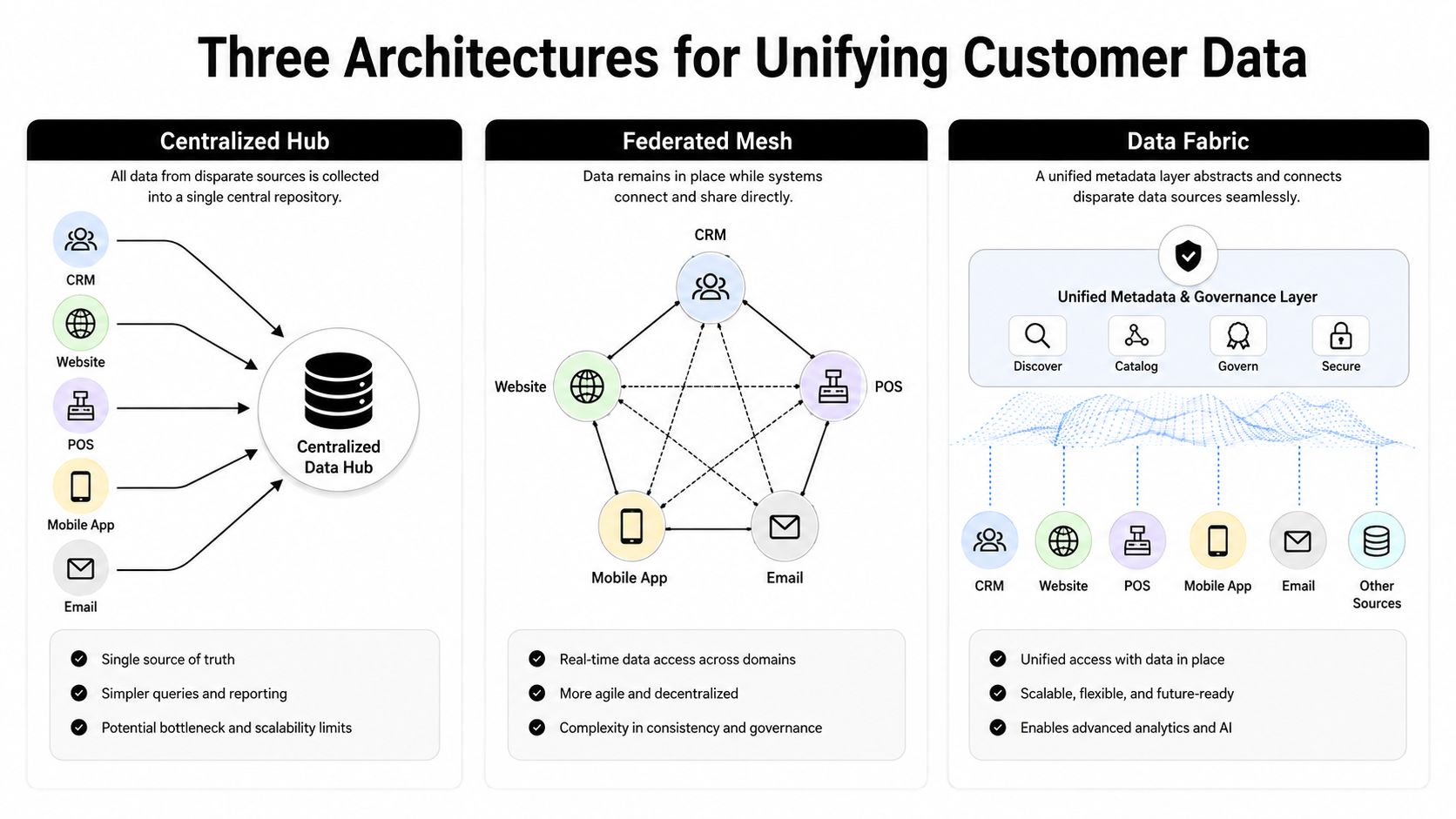
Most conversations about CDI jump straight to a central warehouse or CDP. That works in some environments, but it's not the only pattern, and it's often not the cheapest or fastest path for an SMB. The right architecture depends on how much data you need to centralize, how quickly it must move, and how much governance overhead your team can handle.
Consolidation
Consolidation copies customer data from source systems into one repository, usually a warehouse or CDP-style hub. This is the classic “single source of truth” model, and it's the easiest to explain to executives because all the reporting hangs off one place. It's also the heaviest to maintain, because every source change, schema shift, and identity rule eventually lands on the central team.
This model fits teams that need broad analytics, stronger governance, and a true enterprise customer view. It's a good match when multiple departments must query the same normalized dataset and when duplication risk is low enough to justify the storage and maintenance burden. A useful guide to data warehousing helps frame why this pattern is so common in larger stacks.
Propagation
Propagation starts with a central customer record and pushes curated data back into tools like CRM, email platforms, ad systems, and service software. It's the activation-friendly model. Teams don't have to keep querying the warehouse to use the data, which keeps day-to-day execution closer to the systems people already live in.
For mid-market teams, propagation often lands better than a full-blown centralized analytics build because it solves the practical problem of getting clean customer attributes where work happens. It works especially well when the goal is better campaign targeting, sales follow-up, or suppression logic rather than deep historical analysis.
Federation
Federation accesses data virtually across systems without duplicating everything into one repository. Salesforce's connectivity guidance notes that federation can query data without copying it, which matters when cost, speed, or governance make full consolidation unnecessary (Salesforce customer data integration). That makes federation attractive for partial views, niche use cases, or teams that need to avoid the overhead of maintaining a giant customer warehouse.
Some teams don't need a cathedral, they need a bridge. Federation is often the bridge.
A simple comparison helps.
| CDI Architecture Comparison | Cost Profile | Data Latency | Complexity | Best Fit For |
|---|---|---|---|---|
| Consolidation | Higher upfront and ongoing cost | Lower once built, but depends on refresh cadence | Higher | Larger teams, broad analytics, strict governance |
| Propagation | Moderate | Moderate to low | Moderate | SMBs that need activation in core tools |
| Federation | Lower storage cost | Can be higher because data stays distributed | Lower to moderate | Partial views, phased rollouts, cost-sensitive teams |
The trade-off is blunt. If your team wants one governed record for every customer interaction, consolidation may be worth it. If you mainly need operational clarity in a few tools, propagation or federation can get you there faster, with less platform drag.
Where Data Integration Gets Hard
A sales rep opens a record and sees one email, a marketer segments the same person under another, and support finds a third version tied to a different account. That kind of drift is what makes CDI hard in practice. Customer records usually arrive from web forms, commerce systems, support queues, spreadsheets, and legacy tools, and each source brings its own naming, formatting, and completeness problems. K2view on customer data integration
Identity resolution and matching
Teams need schema contracts, versioning, staging layers, multi-key matching, confidence scores, and human review to avoid merging the wrong people or creating duplicates. K2view on customer data integration That set of controls can look heavy at first, but it is what keeps a “unified” profile from becoming a trust problem.
The practical control point is validation at ingestion, during transformation, and at point of use. If an error is caught only after it reaches a dashboard or automation rule, the business pays for it in bad routing, bad messaging, or bad attribution.
Freshness at scale
Freshness is the other place teams run into trouble. Traditional batch pipelines can lag by hours or days, while real-time or near-real-time systems need CDC, checkpoints, recovery logic, lag monitoring, and schema-change handling to keep operational workflows accurate Estuary on data integration challenges. That matters because even correct data loses value when it arrives too late for the decision.
Operational rule: Incremental sync beats full reloads for most SMB stacks. Full reloads are expensive, slower to recover, and harder to trust.
Latency monitoring is the control point here. If the pipeline starts slipping, the team should know before customer-facing systems do.
Governance and downstream trust
Governance is the final failure mode. A central dataset can still be useless if people do not trust the definitions, if access is unclear, or if excluded fields sneak into activations. Integration work has to define who can change mappings, who can approve merges, and which fields are safe to push into downstream tools.
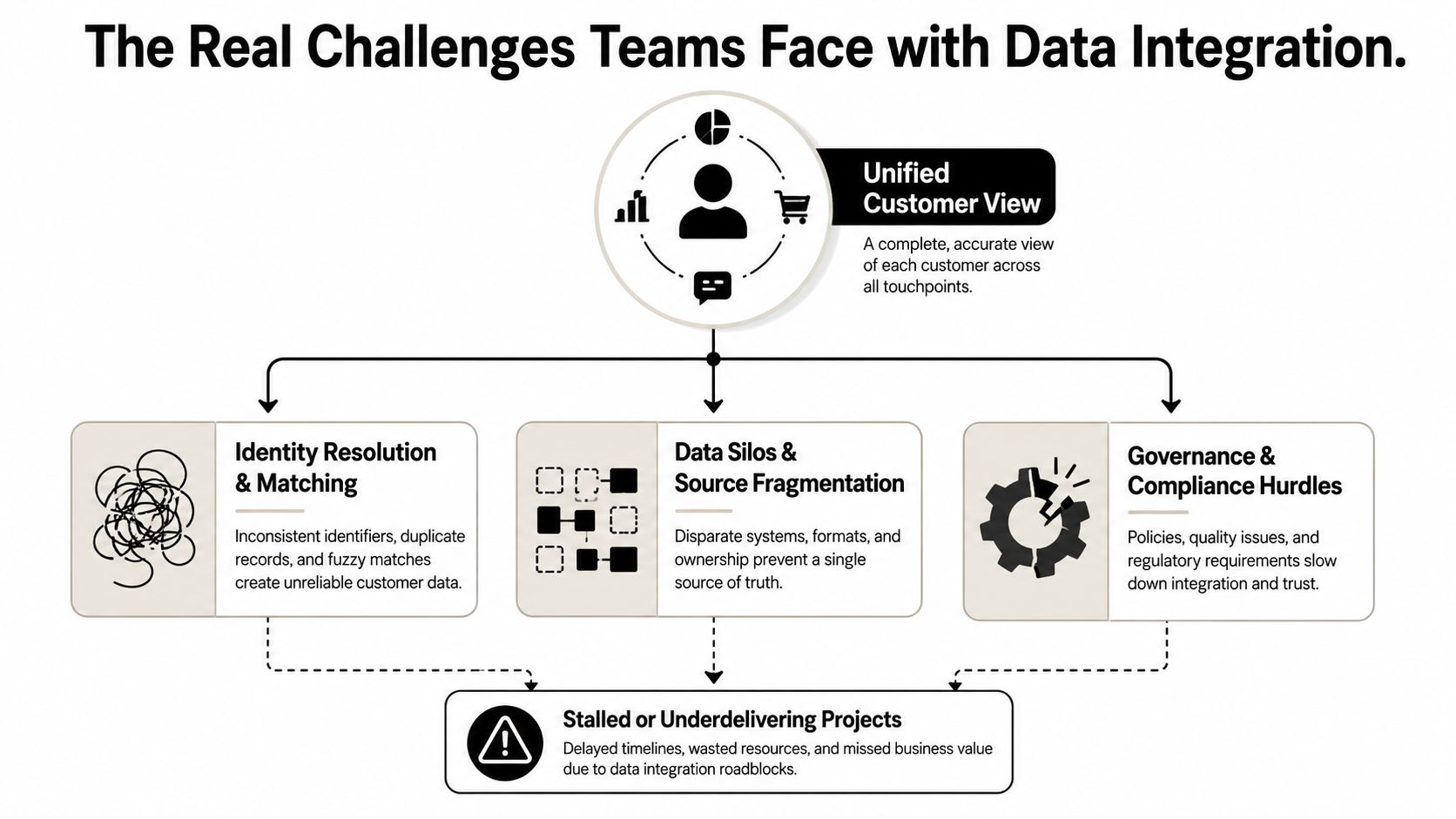
Many CDI projects fail. They do not break in a dramatic way. They create enough ambiguity that teams stop depending on the data, which is worse.
A Phased Implementation Roadmap for SMBs
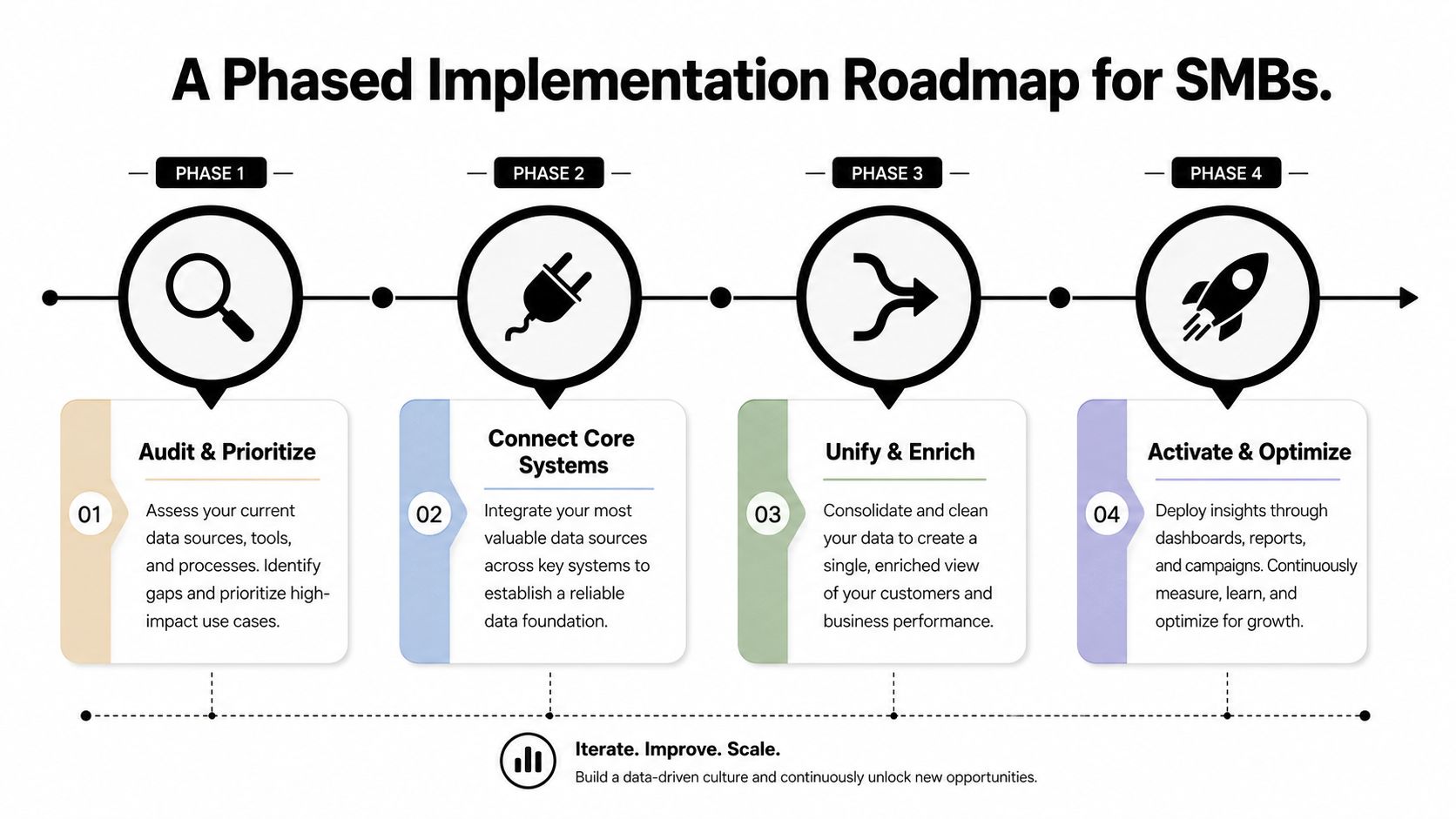
A small team does not need to centralize every customer signal on day one. Start with one business decision, a narrow set of high-value sources, and the architecture that matches your budget and staff capacity. That keeps CDI tied to a real use case instead of a broad transformation plan that never leaves the whiteboard.
Phase one audit and prioritize
Begin with a source inventory. List the systems that hold customer signals, then rank them by business value and data quality. For many SMBs, that means narrowing in on the few systems where identity, intent, and engagement already show up clearly.
Do not move past this phase until the team can answer three questions without hesitation. What data matters, who owns it, and which bad record would cause the most harm if it reached automation.
Phase two connect core systems
Bring the priority systems together using the architecture chosen earlier. Incremental sync is usually the better fit than full reloads, because SMB teams need data moving without turning every update into a heavy operational event. Full refreshes are slower to recover from and harder to keep trustworthy when the stack starts to grow.
Phase three unify and activate
Once the integrated record is in place, send it into the tools that drive customer-facing action. That usually means email platforms, ad audiences, CRM views, and sales dashboards. If the activation layer is dirty, the rest of the stack loses value fast.
Phase four optimize
Only after the core use case is stable should teams expand coverage, add scoring, or build more detailed personalization. That order matters because advanced use cases depend on basic trust. A predictive model built on messy identity data just scales the mess.
For agencies, this phased model is easier to present than a broad transformation project because it gives clients a visible checkpoint. For SMBs, it keeps spending aligned with actual usage instead of future ambition.
Designing for Privacy and the Cookieless Reality
Customer data integration used to be described as if identity were stable and consent were an afterthought. That's outdated. Identity resolution is getting less deterministic as cookies fade, more channels enter the mix, and privacy rules tighten. In that environment, a central record is only useful if it respects what the customer has allowed.
The design choice starts with consent-aware data models. Each record should carry its permission context so downstream tools know what can be used, where, and for which purpose. That sounds simple, but it prevents the common mistake of integrating data first and asking compliance questions later. Acquia's guidance flags privacy, identity, and governance as design-stage issues, not post-launch cleanup items (Acquia on customer data integration).
What to integrate and what to leave out
Not every signal deserves to be pulled into every system. Some data should stay out of activation workflows because its consent scope is narrow, its retention need is weak, or its business value doesn't justify the risk. In practice, that means deciding early which fields are safe for segmentation, which can support internal analysis only, and which should be excluded entirely.
First-party data matters here because it's the most defensible source for ongoing personalization and lead quality work. It also tends to be easier to align with permission logic than stitched-together third-party signals.
A workable governance habit
Set the privacy rule before the sync rule. If a field can't be explained to a customer or a compliance reviewer, it probably shouldn't be flowing into three marketing tools.
That mindset changes how teams build CDI. Instead of asking how much data can be centralized, ask how much data should be operationalized. The answer is rarely everything.
Selecting Vendors and Tracking the Right KPIs
Vendor selection gets messy fast because every platform sounds like it can unify customer data. In practice, the fit depends on the architecture you chose earlier and the team that has to maintain it. A warehouse-centric business, an API-driven team, and a lean SMB with one marketer and one ops lead should not buy the same stack.
The main categories are straightforward. CDPs help when you need identity, segmentation, and activation in one place. ETL and ELT platforms fit consolidation-heavy teams that want controlled data movement. API middleware works well when the goal is operational sync between apps. Data warehouse solutions make sense when analytics and governance are the priority. A useful kpi lead generation guide can help tie those platform choices back to the metrics marketing teams watch.
One practical note. SWAT Marketing Solutions is one option for businesses that need analytics integration, CRM integration, and data-driven strategy support without building the whole stack alone.
What to ask vendors
- Integration capabilities: Can the platform handle the source systems you already use, without forcing a rewrite?
- Data governance and security: Can you control fields, permissions, and sync behavior at the level your compliance process needs?
- Scalability and support: Will the platform still fit when the data volume, user count, or number of use cases grows?
The KPI side should be equally concrete. Track data freshness latency, identity match quality, downstream activation speed, and duplicate record rates. Tie those to business outputs such as lead conversion quality, attribution confidence, and how accurately teams can score or route accounts.
If a CDI dashboard doesn't change a decision, it's reporting theatre.
The best vendors are the ones that match your current architecture, not the ones with the longest feature list. A small team often wins by buying less software and measuring more carefully.
Next Steps for Agencies and Growing Businesses
Agencies should package CDI as a business process, not a software sale. Start with a data audit, map the client's highest-value signals, and recommend the lightest architecture that gets them to action. SMBs should do the same internally, because many discover they need less centralization than they thought and more discipline around source quality.
A simple self-check helps. Do you know which systems hold your best customer signals, who owns each one, and which downstream tool needs the integrated view? If the answer is fuzzy, start with consolidation, propagation, or federation based on the use case, not the buzzword.
I've seen mid-size service businesses get a long way by connecting CRM, website analytics, and email through a federated approach instead of buying a full CDP too early. That kind of phased choice is often the difference between momentum and another stalled platform project. SWAT Marketing Solutions works with businesses that need analytics integration, CRM integration, and practical strategy reviews, so they can turn scattered customer data into something the team uses.
If you want help deciding whether consolidation, propagation, or federation fits your stack, SWAT Marketing Solutions can audit your current systems, map the highest-value customer signals, and recommend a phased plan that matches your budget. Visit SWAT Marketing Solutions to request a practical review and get clear next steps for your customer data integration setup.