
Think of your website as your hardest-working employee. For a small business, a well-designed, high-converting website is a 24/7 salesperson, brand ambassador, and lead generator that never calls in sick. It's the engine that drives modern business growth, plain and simple.
Why a High-Converting Website Is a Non-Negotiable Asset
Let’s get one thing straight: just "having a website" isn't enough anymore. In today's market, your digital presence is often the very first—and sometimes only—impression a potential customer has of your brand. A clunky, outdated, or confusing site doesn't just look bad; it actively costs you money.
It’s the digital equivalent of a leaky roof in your storefront. It deters customers and chips away at your hard-earned reputation.
Take a local bakery, for example. They might make the best sourdough in town, but if their website is a decade old, isn’t mobile-friendly, and has no online ordering, they're in trouble. A potential customer searches "artisan bread near me" on their phone. Your competitor's slick, easy-to-use site pops up, and they place an order in under a minute. The bakery with the better bread just lost a sale—and maybe even a future loyal customer—all because their website failed them.
The Real Cost of a Poor First Impression
This isn’t a rare scenario. A consulting firm could easily fail to land high-value clients because their website looks unprofessional or doesn't load properly on a tablet during a prospect's commute. The visitor quickly assumes that if the firm can't manage its own digital front door, it certainly can't be trusted with a complex project.
This is the real-world business impact of poor website design. It's not just about pretty pictures; it’s about function, trust, and ultimately, revenue.
Your website’s performance is a direct reflection of your business’s credibility. A professional, high-performing site signals competence and reliability, while a neglected one suggests the opposite.
As of 2026, while 73% of small businesses in the US have a website, a surprising 27% still don't. With 81% of shoppers researching online before they even think about buying, those without a site are basically invisible to a massive chunk of potential customers.
Investing in your website is a huge opportunity to stand out. Let's look at the long-term difference between a professional build and a quick DIY job.
The Business Impact of Professional vs. DIY Website Design
| Business Aspect | Professional Design Outcome | DIY/Template Approach Outcome |
|---|---|---|
| First Impression & Credibility | Establishes immediate trust and authority. | Can appear generic, cheap, or untrustworthy. |
| User Experience (UX) | Intuitive navigation keeps users engaged and happy. | Confusing layouts lead to high bounce rates. |
| Conversion Rate | Strategically designed to turn visitors into customers. | Often lacks clear calls-to-action, losing leads. |
| SEO Performance | Built with a solid technical foundation for high rankings. | Misses crucial on-page and technical SEO elements. |
| Mobile Responsiveness | Flawless experience across all devices. | Often "breaks" or functions poorly on phones/tablets. |
| Long-Term ROI | Generates consistent leads and sales, paying for itself. | Becomes a cost center requiring frequent fixes. |
The takeaway is clear: while a DIY site might seem cheaper upfront, a professional design is an investment that delivers tangible returns by building a stronger, more profitable business.
Turning Visitors Into Customers
A high-converting website does more than just look good; it skillfully guides visitors toward a specific action. This is where strategic design becomes a powerful business tool. Every element, from a button's color to the layout of your navigation menu, should be intentional.
The goal is to make it incredibly easy for a user to:
Find what they need quickly: Intuitive navigation means users aren’t left clicking around in frustration.
Understand your value: Clear messaging explains what you do and why you’re the best choice.
Take the next step: Compelling calls-to-action (CTAs) like "Get a Quote" or "Book Now" are easy to spot and use.
To ensure your website truly works for you, it pays to understand the proven strategies to increase conversion rates that drive real growth. Investing in professional design isn't just an expense; it's a foundational investment in your company's future.
Building Your Website's Strategic Blueprint
A great website is never an accident. It doesn't start with picking out cool colors or a trendy font; it begins with a rock-solid strategy. Before a single pixel is placed, you need a blueprint that maps out exactly what you need the website to accomplish for your business. Honestly, this planning phase is the single most important part of building a site that actually gets you results, not just one that looks pretty.
The very first question to ask is: What is the number one goal of this website? The answer to that question drives every single decision from here on out. Are you trying to sell products directly from the site? Get qualified leads for your service business? Make it dead simple for people to book appointments? Each one of these goals demands a completely different design and user experience.
Defining Your Business Objectives
Getting crystal clear on your goals is non-negotiable. Vague ideas like "I want more customers" aren't going to cut it. You have to get specific and think about the exact actions you want visitors to take when they land on your site.
Let’s take a local HVAC company, for example. Their main goal is to make the phone ring for emergency repairs and to get people to schedule non-urgent service calls. For them, success isn't about how many people read their "About Us" page. It’s about how many panicked homeowners can find their phone number in two seconds and book a technician.
For this HVAC business, the key objectives would look something like this:
Generate qualified leads with a "Request Service" form that’s impossible to miss.
Drive emergency calls by plastering a big, bold, click-to-call phone number at the top of every page.
Book maintenance appointments through a simple online scheduling tool.
Build trust by showing off their certifications, glowing customer reviews, and maybe even some transparent pricing info.
A website without clear business objectives is like a ship without a rudder. It might look impressive, but it’s not going anywhere meaningful. Every page, button, and image must serve a purpose that moves the business forward.
Laying this strategic foundation is what ensures your investment in small business website design actually pays off. It’s how you turn a simple online brochure into a machine that brings in new business.
Mapping the Customer Journey and User Flow
Once you know your goals, you have to think about the customer's journey. Step into their shoes for a minute. For our HVAC company, that journey often starts with a frantic Google search like "AC repair near me" on the hottest day of the year.
The flow of your website should make their life easier, not harder.
Landing Page: The user lands on a page that instantly screams, "Yes, we fix AC units fast!" and clearly shows their service area.
Immediate Action: There’s a huge button that says "Schedule Emergency Service" right next to a phone number you can tap to call. No searching required.
Simple Form: If they click the button, the form only asks for the bare essentials—name, phone, address, and what’s wrong.
Confirmation: The second they hit "submit," a confirmation page pops up, letting them know a tech will call within 15 minutes.
This path is completely streamlined. It removes all the guesswork and guides a stressed-out homeowner right to the solution. Anything that gets in the way of that—like a long-winded company history or a confusing menu—is just an invitation for them to click away to your competitor.
Creating a Purpose-Driven Sitemap
The last piece of your blueprint is the sitemap. Think of it as the architectural plan for your website, showing all the pages and how they link together. It’s what makes navigating your site feel natural and intuitive.
For the HVAC company, a smart sitemap would look something like this:
Homepage (Your digital front door)
Services
AC Repair
Heating & Furnace Repair
Maintenance Plans
Service Areas (A page listing all the towns they cover to boost local SEO)
About Us (To build trust and show off their expertise)
Contact Us (With a map, form, and phone number)
Blog (For sharing helpful tips that attract search traffic)
This kind of logical structure makes it easy for both people and search engines to understand what your site is all about. As you plan all this out, you might also be wondering about timelines. We’ve put together a guide that answers the common question of how long it takes to build a website, and this strategic phase is a big piece of that puzzle. By putting in the work here, you ensure your new site is built to convert visitors into customers from day one.
Designing for Trust and a Seamless User Experience
Once you have your strategic blueprint mapped out, it's time to bring that vision to life. This is the fun part, where we move from goals on a spreadsheet to a real, tangible experience for your customers. But it's also where a lot of businesses go wrong.
A great design isn't just about looking good; it's about building instant trust and making your website effortless to use. This is often called User Experience, or UX. When it's done right, you don't even notice it. A customer lands on your site, finds exactly what they're looking for, and completes their goal without a single moment of frustration.
The Core of User-Friendly Design
Think of it this way: the visual elements like colors, buttons, and fonts are the User Interface (UI). The overall feeling someone gets when interacting with those elements is the User Experience (UX). For a small business, getting both right is a huge deal. In fact, a staggering 75% of consumers will judge your company's credibility based on how your website looks and feels.
A clunky, outdated, or confusing site is an instant credibility killer. Your design needs to guide visitors naturally toward the finish line.
Intuitive Navigation: Can someone find your services page without having to hunt for it? Your main menu should be simple and predictable.
Clear Calls-to-Action (CTAs): Buttons like "Get a Free Quote" or "Shop Now" need to pop. Use action-focused words and a color that stands out from the rest of the page.
Readable Typography: Stick to clean, legible fonts. That tiny, elaborate script might look artistic, but if people can't easily read it on their phone, it’s not working.
Here’s a simple look at how your goals, sitemap, and user journey all come together to create the foundation for the design.
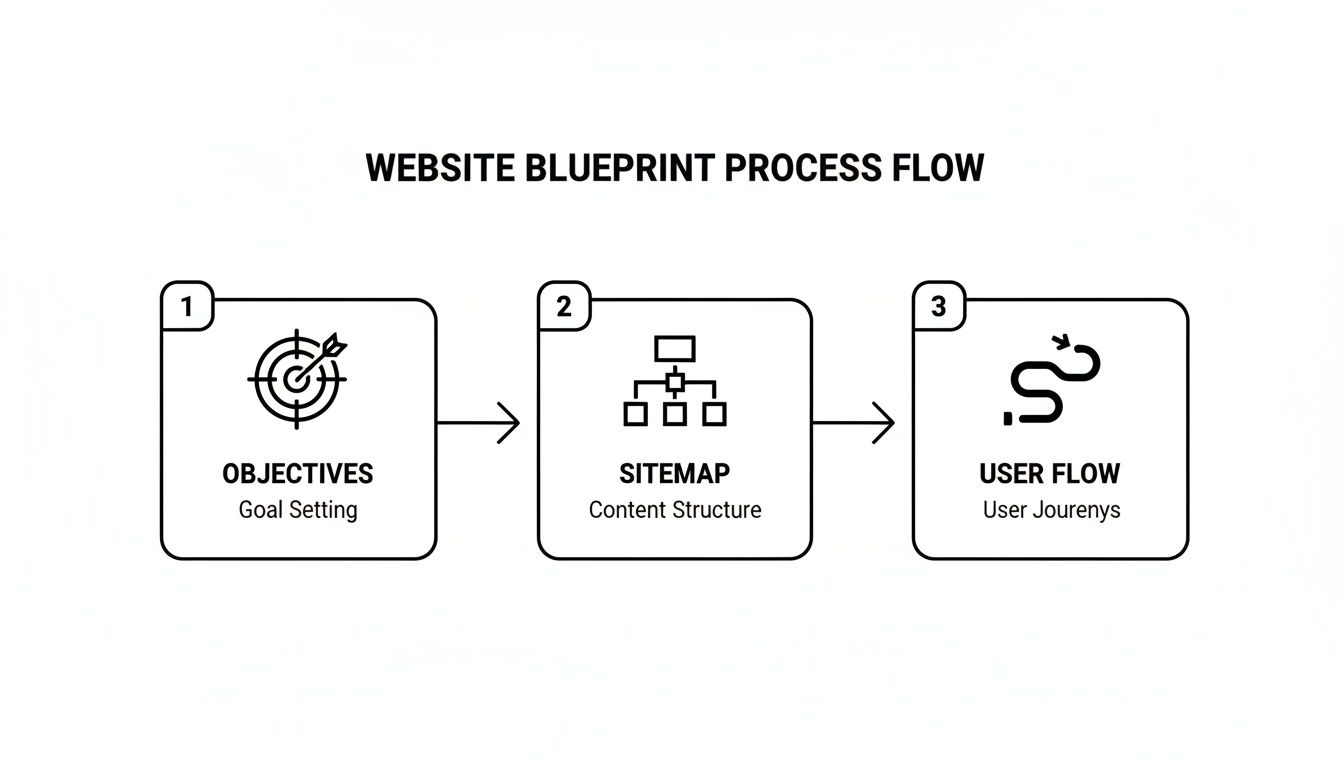
As you can see, a great user experience starts long before you ever pick a color palette. It begins with a solid, logical plan.
Branding Through Visuals
Your website's visual identity is your chance to show off your brand's personality. Every color, font, and image you choose should work together to tell a consistent story. This isn't just about picking your favorite colors; it's a strategic decision.
A high-end financial advisor, for instance, needs a site that communicates security, professionalism, and trust. You'd expect to see a color palette of deep blues and grays, sophisticated fonts, and professional headshots. The whole experience feels calm and authoritative.
Now, imagine a local coffee shop. Their website needs to feel warm, friendly, and energetic. They’d likely use earthy tones, maybe a bright accent color, playful fonts, and mouth-watering photos of lattes. The design creates a completely different emotional connection.
Your design choices are a silent conversation with your customer. A financial advisor’s site can’t look like a coffee shop’s, and vice versa. Authenticity in design builds trust by aligning visual cues with customer expectations.
Making It Effortless to Engage
At the end of the day, great design removes friction. It makes it dead simple for customers to do business with you. No one should have to pinch-and-zoom to read your text on a mobile device, and they certainly shouldn't have to go on a scavenger hunt to find your phone number.
Here are a few practical tips to create a frictionless experience:
Prioritize "Above the Fold": Put your most important message and your primary call-to-action right at the top of your homepage. This is the first thing people see without scrolling, so make it count.
Use White Space: Don't cram your pages with text and images. Giving elements room to breathe—often called white space or negative space—helps guide the user's eye and makes your site feel clean and professional.
Create a Visual Hierarchy: Make the most important things on the page the most prominent. Use size, color, and placement to draw attention to your main headlines, key benefits, and CTAs.
By focusing on these principles, you create more than just a pretty website. You build an effective tool that accurately represents your brand and turns casual visitors into loyal customers.
Engineering Your Site for Peak Performance and SEO
A visually stunning website is only half the battle. If that beautiful design is slow to load, broken on a smartphone, or completely invisible to search engines, it's failing your business. This is where we get into the technical foundation—it’s the engine under the hood that powers real results.
Think of it this way: your design is the storefront, but performance and SEO are the sturdy foundation and the bright, welcoming sign out front. Without them, even the most beautiful shop will sit empty. This part of the process ensures that once your site is built, it can actually be found and used effectively by your ideal customers.
Building for a Mobile-First World
The conversation is no longer about whether your website should work on mobile; it’s about designing for mobile first. Over 60% of all website traffic now comes from mobile devices, and Google primarily uses the mobile version of a website for indexing and ranking.
This means your site must offer a flawless experience on a small screen. Buttons should be easy to tap, text has to be readable without pinching and zooming, and menus need to be simple. A responsive design, which automatically adapts to any screen size, is no longer a "feature"—it's an absolute necessity.
Choosing Your Content Management System
A Content Management System (CMS) is the software that allows you to create, manage, and modify your website's content without needing a developer for every little change. It’s the user-friendly backend that empowers you to update a blog post or change a product price yourself.
For most small businesses, the choice comes down to a few popular platforms:
WordPress: This is the giant in the room, powering over 43% of all websites. It's incredibly flexible and has a massive ecosystem of plugins and themes, making it adaptable for almost any business need.
Squarespace/Wix: These are all-in-one website builders known for their user-friendly drag-and-drop interfaces. They're a great starting point for simpler sites but can be less flexible for custom functionality or advanced SEO.
Shopify: If you're running an e-commerce business, Shopify is the industry standard. It's built from the ground up to handle products, payments, and shipping with ease.
The right CMS depends entirely on your business goals. For maximum flexibility, scalability, and SEO potential, a self-hosted WordPress site is often the best long-term investment.
The Critical Role of High-Performance Hosting
Your website's hosting is like the plot of land your business is built on. You can have a fantastic building, but if it’s on a shaky foundation in a bad neighborhood, you're going to have problems. Cheap, shared hosting can lead to slow load times, poor security, and frequent downtime—all of which kill user experience and hurt your Google rankings.
A fast website isn't just a convenience; it's essential. Studies show that a one-second delay in page load time can result in an 11% drop in page views. People are impatient, and a slow site will send them straight to your competitors.
Your website hosting is a direct investment in your customer's experience and your search engine visibility. Don't cut corners here; a fast, secure site is a non-negotiable part of a successful digital strategy.
On-Page SEO Essentials for Visibility
On-page SEO is all about optimizing individual web pages so they can rank higher and earn more relevant traffic from search engines. This is where you bake your content strategy directly into the technical build of your site.
Here are the key elements to get right:
Keyword-Optimized Content: Your service pages, blog posts, and homepage should naturally include the terms your customers are actually searching for.
Effective Meta Descriptions: This is the short snippet of text that appears under your page title in search results. It needs to be a compelling summary that makes people want to click.
Proper Header Tags (H1, H2, H3): Headers structure your content, making it easier for both readers and search engines to understand what your page is about.
SSL Security: An SSL certificate (the little padlock icon) encrypts data between your site and its visitors. It's a critical trust signal and a confirmed Google ranking factor.
By focusing on these technical and on-page elements from the start, you build a website that not only looks great but is engineered to attract and convert customers. For a deeper dive, learn more about the benefits of SEO for small businesses and how it drives sustainable growth.
Launching and Igniting Your Local Search Presence
Pushing your website "live" isn't the finish line; it's really just the starting line. A great launch is a carefully planned process. The goal is to make sure all your hard work results in a flawless experience for your visitors and, more importantly, starts bringing in real, local customers from day one.
Before you flip that switch, you need to do one last, meticulous check. Think of it like the final walkthrough before opening a new retail store. You've got to hunt for any broken links, test every single contact form, and make absolutely sure the site loads perfectly on different mobile devices. Just imagine a potential customer trying to contact you, only to find your form is broken—that's a lost lead you can't afford to miss.

Your Pre-Launch Website Checklist
A structured checklist is your best friend here—it helps prevent critical mistakes. Running through these final tasks ensures you’re launching a site that’s both professional and functional.
| Category | Task | Status (To-Do/Done) |
|---|---|---|
| Technical Health | Verify SSL certificate is active for a secure connection. | |
| User Experience | Test all internal and external links to ensure they work. | |
| Functionality | Submit a test entry on every contact and lead capture form. | |
| Mobile Usability | Confirm the site displays correctly on both phones and tablets. | |
| Analytics Setup | Install Google Analytics and connect to Google Search Console. |
With this checklist complete, you can finally launch with confidence. Now, the focus shifts from building the site to making it visible to the people who matter most: your local customers.
Mastering Your Local SEO Foundation
For most small businesses, local search is everything. When someone in your town searches "plumber near me" or "best coffee in Morristown," you absolutely have to show up. This is where local Search Engine Optimization (SEO) comes into play, starting with your most important local asset.
Your Google Business Profile (GBP) is essentially your digital storefront on Google Search and Maps. It’s often the very first interaction a potential customer has with your business. An incomplete or poorly managed profile is a huge missed opportunity, especially since 46% of all Google searches are for local information.
Think of your website as your home base and your Google Business Profile as the giant, flashing billboard on the main highway pointing directly to it. One cannot be truly effective without the other.
Optimizing your profile is about more than just listing your address. You need to upload high-quality photos, pick all the right business categories, actively ask for customer reviews, and use the Q&A feature to answer common questions before they're even asked. For a detailed walkthrough, our guide on https://swatmarketingsolutions.com/how-to-optimize-google-business-profile/ provides a clear, actionable roadmap.
Ensuring NAP Consistency Across the Web
Beyond your GBP, search engines look for consistent signals all over the internet to verify your business's legitimacy. The most critical signal is your NAP data—your business Name, Address, and Phone number.
This information has to be perfectly identical everywhere it appears online. That means from your website’s footer to directories like Yelp, Angie's List, and other industry-specific sites. Even a tiny inconsistency, like using "St." on one profile and "Street" on another, can confuse search engines and water down your local ranking authority.
A thorough NAP audit is a crucial step right after you launch.
Audit major directories to find and correct any variations in your listing.
Update your website to ensure the contact info is 100% correct on every single page.
Build new citations on reputable local or industry directories to strengthen your online footprint.
As you get ready to launch, understanding these strategies is key. For some businesses, diving deep into niche guides like this one on Local SEO for Contractors can make all the difference. By combining a flawless launch with a strong local SEO strategy, your new website becomes much more than an online brochure—it becomes a magnet for nearby customers who are actively looking for exactly what you offer.
Measuring Performance and Fueling Future Growth
Your website isn't a static brochure you can just "set and forget." Think of it as a living, breathing part of your business that needs attention to keep performing. Once it's live, the real work starts: figuring out what’s working, what’s not, and where your next big opportunity is.
Honestly, launching a beautiful site without tracking its performance is just a shot in the dark. This ongoing process of measuring and refining is what turns your small business website design from a one-time expense into the core of your marketing—an investment that keeps paying you back.
Tracking What Truly Matters
It’s incredibly easy to get lost in a sea of data. The trick is to ignore the "vanity metrics" and focus on the numbers that actually affect your business goals.
Here are the Key Performance Indicators (KPIs) you absolutely need to watch:
Conversion Rate: This is the big one. It’s the percentage of visitors who do what you want them to do, like fill out a form or buy a product. A low conversion rate is a flashing red light that something is wrong with your messaging or user experience.
Traffic Sources: Where is your traffic actually coming from? Is it organic search, social media, or direct visits? This tells you which of your marketing channels are pulling their weight.
Keyword Rankings: Keep a close eye on where you stand in Google for your target search terms. Seeing your rank for "plumber in Morristown" move up is solid proof your SEO is working.
Bounce Rate: This is the percentage of people who land on a page and leave without clicking anywhere else. A high bounce rate can mean your content is boring or your landing page isn't what they expected.
A website without analytics is like driving blind. Actionable insights from your data are the fuel for making smarter marketing decisions and steering your business toward sustainable growth.
Turning Data Into Actionable Insights
Once you're tracking these KPIs, you can start asking the right questions. For instance, if your "Services" page has a sky-high bounce rate, maybe it's time to rewrite the copy or add a compelling video. If organic search traffic is lagging, that’s your cue to double down on content and SEO.
This cycle of measure, analyze, and optimize is what separates a successful website from a stagnant one. And don't forget regular maintenance—keeping your site secure, fast, and up-to-date is just as critical.
Strategies for Long-Term Growth
A great website is the foundation for everything else you do in digital marketing. It's the destination you send people to from your ads, social posts, and emails, creating a powerful system for attracting and converting customers.
Content Marketing and Blogging: Consistently publishing valuable content is one of the best ways to improve your SEO. A blog post like "How to Choose the Right Flooring for a High-Traffic Home" can attract local customers searching for solutions, instantly positioning you as the expert they need.
Email List Integration: Use your website to build your email list by offering a newsletter or a helpful guide. An email list is a direct line to your most engaged audience, allowing you to nurture leads and drive repeat business without fighting social media algorithms.
By combining diligent performance tracking with smart growth tactics, your website becomes much more than an online presence—it becomes a powerful engine that consistently generates leads and revenue for your business.
Common Questions on Small Business Website Design
Investing in a professional website is a big step, and it's natural to have a lot of questions. Getting clear, straightforward answers is key to feeling confident that you're making a smart move for your business. Let's dig into some of the most common things people ask.
How Much Should I Budget for a Professional Website?
For a professional small business website, you can expect the investment to fall somewhere between $3,000 to over $10,000. The final price really hinges on what you need. The number of pages, any custom features like an online store or a booking calendar, and how deep we go with the SEO and content strategy all play a role.
Try to think of your website not as a cost, but as an investment in your hardest-working employee. A well-built site is designed to bring in new leads and sales, paying for itself many times over.
A simple, beautiful "brochure" style website will land on the lower end of that range. On the other hand, a complex e-commerce store with all the bells and whistles will be at the higher end.
How Long Does the Website Design Process Take?
A standard timeline for a custom small business website is usually between 6 and 12 weeks. This schedule gives us enough time to handle every critical phase properly, without cutting corners on the strategic work that actually makes a website successful.
The whole process is broken down into a few key stages:
Strategy and Discovery: 1–2 weeks
Design Mockups and Revisions: 2–3 weeks
Development and Build: 3–5 weeks
Final Testing and Launch: 1–2 weeks
Of course, this can shift depending on how complex the project is and how quickly we get feedback and content from your end.
Will I Be Able to Update the Website Myself?
Yes, absolutely. We build modern websites on user-friendly Content Management Systems (CMS) like WordPress. This technology puts the power right in your hands, letting you easily update text, add new blog posts, or swap out photos without knowing a lick of code.
A good agency will always include training to make sure you're comfortable managing your day-to-day content. This leaves us to handle the more technical maintenance, so you can focus on running your business.
Ready to build a website that drives real growth for your business? The team at SWAT Marketing Solutions specializes in creating SEO-ready, high-converting websites designed to attract and convert customers. Get your free website assessment today!