
You're staring at a small monthly budget, a handful of leads, and a platform dashboard that keeps telling you to “trust the algorithm.” Maybe you've tried search ads before and got clicks that didn't turn into calls. Maybe you've never launched anything because PPC felt like something larger companies had the time, cash, and staff to figure out.
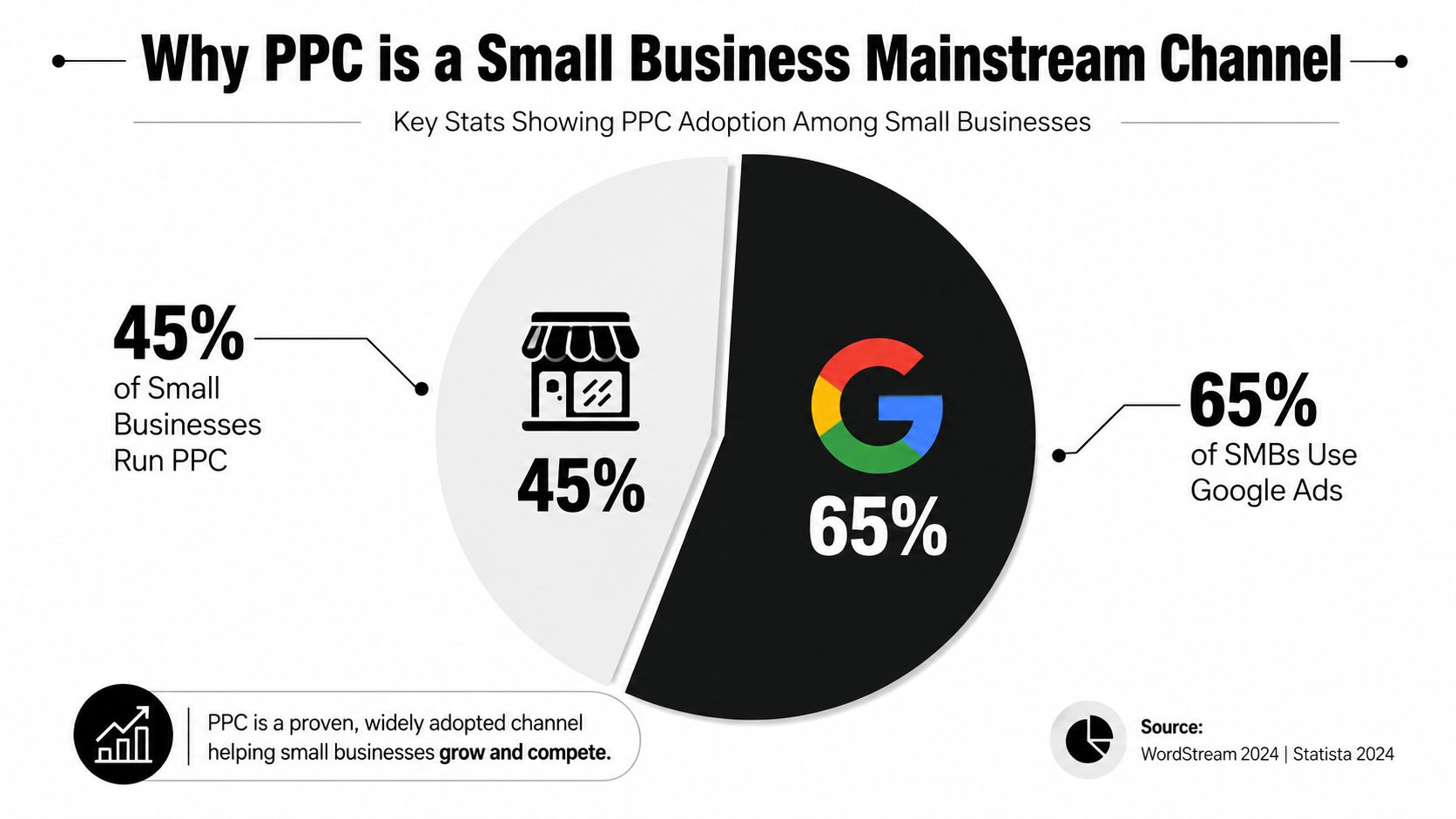
That hesitation used to make sense. It doesn't anymore. PPC advertising for small business has moved from a specialized tactic to a standard acquisition channel, with roughly 45% of small businesses and about 65% of SMBs using PPC or Google Ads, while Google Ads holds an estimated 69.04% share of the PPC market and 98% of PPC marketers in the U.S. run campaigns on Google (99Firms PPC stats). The question now isn't whether a small business should consider PPC, it's whether the account is set up to learn from real customers instead of noisy traffic.
If you're trying to compare scope, pricing, and setup help, a practical starting point is PPC management for small business, especially if you want to see how campaign management gets handled when the budget is tight and the service area is narrow.
Why PPC Has Become a Mainstream Channel for Small Businesses
A local owner usually feels the pressure first. The phone rings less often, the inbox slows down, and someone says, “We should probably run ads,” right when a competitor starts showing up above the fold for the same service. Search has settled into that reality, and it now rewards whoever can answer intent quickly.
The adoption numbers explain why. About 45% of small businesses and roughly 65% of SMBs were using PPC or Google Ads by 2025, which shows how far this channel has moved from experiment to routine for many firms (99Firms PPC stats). Google Ads still dominates paid search, with one source estimating 69.04% share of the PPC market and another noting that 98% of PPC marketers in the U.S. run campaigns on Google.
For a plumber, that means the person searching “burst pipe repair near me” is often seeing ads before a map result. For a retailer, it means a product search can become a direct response channel instead of a vague awareness play. For a B2B firm, it means the right query can go straight to a booked call, a quote request, or a demo form without waiting on referral traffic.
The bigger issue is what happens after the click. Small business PPC works best when the account is built to separate real buying signals from noise, because Smart Bidding only learns from the conversions you feed it. If those conversions are inflated by spam, low-quality form fills, or mismatched intent, the automation keeps optimizing toward the wrong traffic.
Practical rule: If your buyer already types the problem into Google, PPC is usually worth testing before you spend months hoping organic traffic fills the gap.
That is why account structure and conversion quality matter from day one. A small team does not need more clicks, it needs cleaner data, and that is where PPC management for small business becomes useful as a reference point for setup and ongoing optimization. If you want a useful way to decide whether search should get budget at all, compare paid search with CPC or CPM and start with the model that matches your buying cycle.
The shift matters because waiting is no longer neutral. Every month without a paid search presence gives more room to competitors who already know how to answer that intent.
Planning a 90-Day Test Budget That Holds Up
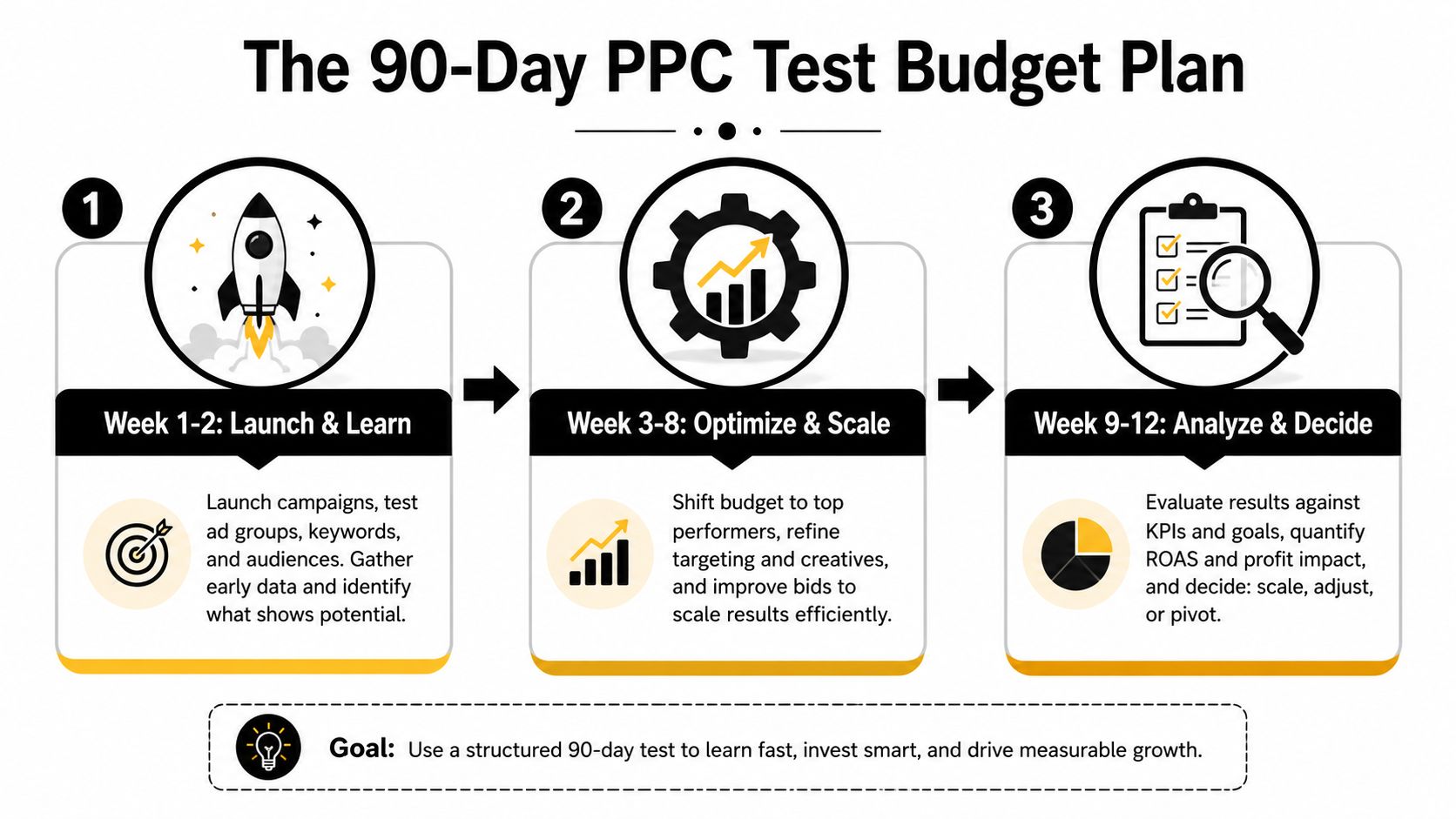
A weak PPC campaign usually does not fall apart because the ads are unusable. It falls apart because the test window is too short, the budget came from guesswork, and someone judged the account before it had enough clean data to say anything useful. A 90-day test gives you space to learn when it is run as a measurement exercise.
Start With target CPA and a conservative conversion rate
The cleanest way to size a test is to work backward from the value of a customer. Start with a target CPA, use a conservative conversion rate of 3% as the baseline, check Keyword Planner for expected CPC, then calculate maximum CPC as target CPA divided by conversion rate (Quake Media PPC guide). That keeps the budget tied to economics instead of an arbitrary daily spend.
A simple example helps here. If a lead is worth enough to support a certain acquisition cost, and your expected conversion rate is modest, the max CPC follows from that math. You do not need a giant spreadsheet for this, just a clear assumption set and the discipline to avoid changing it every time the first few clicks look expensive.
Split the budget by purpose, not by hope
The same guide recommends roughly 70% of spend for core service keywords and 30% for experimentation, with at least 100 clicks per ad group before treating performance differences as meaningful (Quake Media PPC guide). That matters because most small accounts do not have enough volume for quick conclusions. If one ad group has 14 clicks and another has 19, the difference usually reflects noise, not strategy.
A workable 90-day budget often looks like this:
- Core terms first. Put most of the spend on keywords tied directly to the service, product, or offer that already converts.
- Test in a controlled lane. Use the smaller share for a new match type, a new audience layer, or a second landing page.
- Hold the line on data volume. Do not decide a term is bad until the group has enough click volume to mean something.
- Use the right cost model for the channel. If you are comparing paid search to other media, the choice between CPC or CPM should match how buyers move through your funnel.
- Keep one lead-quality benchmark in view. For service businesses, a reference point such as roofing ads cost per lead can help you pressure-test whether your target CPA is realistic.
The biggest mistakes are easy to spot. Underfunding the test window creates false negatives. Broad themes with no click volume give you no usable signal. Skipping negative keyword maintenance in the first 30 days lets junk traffic consume budget before the account has a chance to stabilize (Quake Media PPC guide).
Choosing the Right PPC Platform for a Small Business
A small business does not need every platform. It needs the platform that matches how the buyer searches, how strong the offer is, and how fast the business can turn a click into revenue. Platform choice should be a deliberate decision, not an automatic default.
Google Ads is still the first stop for many lead-driven accounts because search intent is direct and the economics are measurable. Recent benchmark reporting shows Google Search CPC can vary widely, with average conversion rates and returns also moving by industry and account quality (Snowball Creations PPC statistics). That spread is exactly why Google search often makes sense when a customer already knows the problem and is actively looking for a solution.
Use intent strength to guide the platform
Microsoft Advertising can make sense when you want incremental search volume without assuming every prospect is inside Google. Meta Ads works better when the offer benefits from visual proof, remarketing, or a lower-friction discovery path. TikTok Ads can fit a brand that can produce short-form creative with enough clarity to make the product or service feel real fast, but it is rarely where I would send a lean local services budget first.
A roofing business is a good example. The clicks that matter usually come from intent-heavy search, not broad social browsing. If you want a practical benchmark for that niche, roofing ads cost per lead helps frame the channel around acquisition economics, not vanity reach.
A useful decision tree is simple:
- If the buyer is searching a service today, start with Google Ads.
- If the buyer needs repeated exposure before action, consider Meta Ads and remarketing.
- If the product benefits from quick visual demonstration, test short-form video only if the creative is strong enough to justify it.
- If your region or audience skews toward Microsoft's search inventory, add it after the core Google campaign has signal.
For social ad structure, how to create Facebook ads is a useful reference if you are matching offer, audience, and creative format without overbuilding the campaign.
The right answer is rarely a permanent one-channel setup. Start where intent is highest, then earn the right to expand once the account has clean conversion data and a signal worth scaling.
Building Keyword and Audience Targeting That Filters Out Junk Traffic
Targeting is where small businesses either save budget or burn through it. Broad match themes, sloppy geography, and missing negatives usually don't produce more leads, they produce more irrelevant searches that look active in the dashboard and useless in the pipeline.
Start with commercial intent, then tighten the account structure
High-intent terms usually sit closest to the buyer's problem, so they should come first. That means service keywords, “near me” queries, and location-specific searches for businesses that serve a defined area. Ad groups should stay tight enough that the ad copy can mirror the search terms without sounding forced.
A plumber doesn't need one giant bucket for all plumbing needs. A dental practice shouldn't lump emergency visits, cosmetic work, and routine cleanings into the same message. A small ecommerce brand often does better when product categories stay separate enough to match search intent and landing page content.
Layer audience signals after the search foundation
Once the keyword base is clean, audience signals can improve efficiency. In-market segments, customer match lists, and lookalikes can help, but they're not substitutes for search intent. They work best as filters and modifiers on top of an already relevant query set.
The hygiene items are essential:
- Negative keywords from day one. Add exclusions before the first wasted clicks pile up.
- Geo-targeting that matches service reality. Use the actual service area, not an overly broad region.
- Ad scheduling that follows conversion behavior. Run harder when customers pick up the phone or complete forms.
Some of the best small accounts I've seen are boring in the right way. Tight geography, clear negatives, and disciplined query cleanup do more than clever audience layering ever will.
If you want a conceptual guide to how audience filters fit into a campaign stack, audience targeting essentials is a helpful companion piece for the broader logic of who should see what and when.

Writing Search Ads and Landing Pages That Convert Together
A good search ad should feel like a promise. The landing page should feel like the proof. When those two pieces don't match, click-through can stay decent while conversion rate falls apart.
Make the headline, benefit, and proof line up
Search ad copy should start with the keyword or a close variant in the headline, move to a specific benefit in the second line, add proof in the third line, and finish with a clear CTA. That structure works because the user sees a continuation of the search intent instead of a random brand statement.
Weak copy sounds like a brochure. Strong copy answers the query. “Fast, friendly service” is too vague if the customer wants the leak fixed today. “Emergency leak repair with same-day dispatch” is much closer to what the user typed.
The landing page should mirror the same promise without distraction. One offer above the fold is usually enough. Add trust signals like reviews, certifications, and real photos, then keep the form short enough that a busy buyer doesn't abandon it halfway through.
Reduce friction before launch
Page speed matters because mobile users won't wait around for a page to settle. Form length matters because every extra field adds hesitation. So does layout, because too many offers on one page dilute attention.
A simple pre-launch checklist helps:
- One primary offer. Don't split attention across multiple CTAs.
- Proof near the action. Put trust signals close to the form or call button.
- Minimal form fields. Ask only for what sales needs.
- Mobile-first layout. Design for the phone screen first, not the desktop mockup.
The strongest pages feel almost plain. They make the offer obvious, the next step easy, and the trust stack visible without making the user hunt for it. That's usually where a small business earns the lead it paid for.
Setting Up Conversion Tracking That Smart Bidding Can Learn From
Small business accounts often stall here. The ads run, the clicks arrive, and the platform starts optimizing toward whatever signal it can find, even if that signal is a form fill from a spam lead, a bored job seeker, or a duplicate record. Weak data teaches Smart Bidding the wrong lesson.
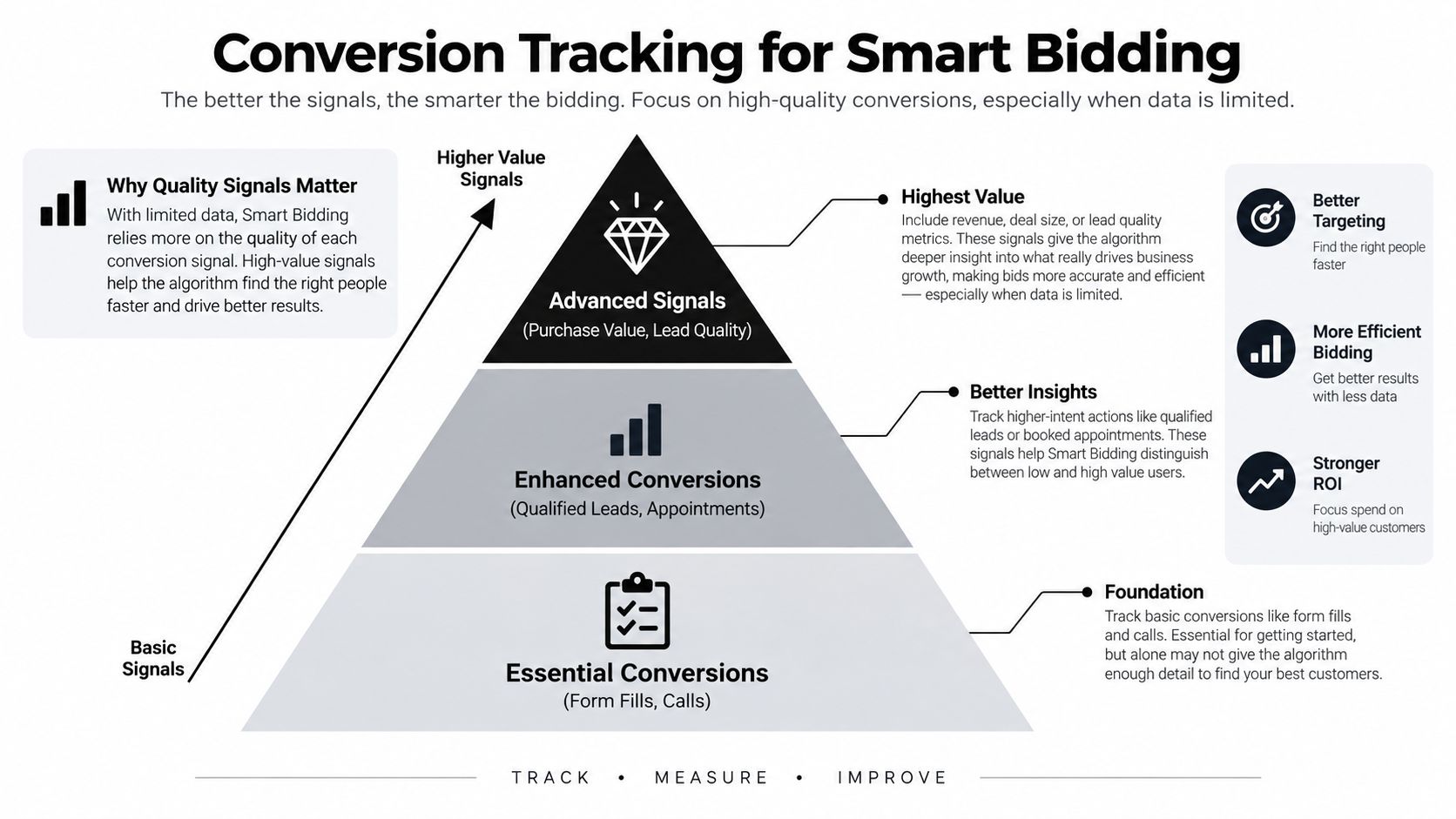
Beyond tracking conversions, the goal is to feed the bidding system qualified conversions so it can separate a real prospect from a noisy interaction. One recent industry guide recommends server-side tracking, CRM integration, and click-fraud filtering so the system learns from real customers instead of bots or low-quality leads (Network Solutions PPC strategies).
Build the signal stack in layers
Start with the basics. A pixel or tag should capture the action that matters most, but that alone often isn't enough for a lean account. Enhanced conversions and server-side tracking can improve the match rate, while CRM uploads help the platform learn which leads become opportunities or customers.
That is the shift that matters. A business owner may count a form fill as the win. In practice, the platform performs better when it learns which form fills turn into booked jobs, sales conversations, or closed revenue. If every submission gets treated the same, the algorithm optimizes for volume instead of quality.
For a lead-gen business, KPI lead generation is a useful lens for deciding which downstream actions should count as real business signals.
Qualified signal rule: If a conversion doesn't tell you whether the lead was real, valuable, and worth a follow-up, it is not enough to train automation on its own.
Small budgets make this even more important. Low data volume means each bad signal carries more weight. A cleaner measurement stack often beats a clever bid strategy, especially early on.
If you want a small-business PPC setup built around real lead quality instead of vanity clicks, SWAT Marketing Solutions can help with campaign structure, landing pages, analytics integration, and the tracking through KPI lead generation.
Running a Weekly Optimization Workflow in the First 90 Days
Optimization should feel like routine maintenance, not a hero project. In the first 90 days, the campaign needs a simple weekly cadence so small problems don't sit long enough to distort the account.
Monday is for pacing. Check spend against plan, glance at quality signals, and confirm the campaign hasn't blown through budget on one ad group. Wednesday is for cleanup. Review the search terms report, add negatives, and remove obvious junk before it keeps bidding against you.
Friday is for performance. Look at cost per conversion by ad group, not just clicks, and make small bid adjustments where the signal is stable. Every two weeks, compare ad copy tests on actual click and conversion behavior, then pause the weaker version if the pattern is clear.
A campaign needs human attention when the same bad search terms keep resurfacing, one location is consuming spend without a matching lead pattern, or the conversion data looks suspiciously clean but doesn't show up in sales follow-up. Those are usually signal problems, not bid problems.
By the end of 90 days, the goal isn't perfection. It's a campaign that knows what good traffic looks like, what bad traffic looks like, and where to send the next dollar.
If you want a small-business PPC setup built around real lead quality instead of vanity clicks, SWAT Marketing Solutions can help with campaign structure, landing pages, analytics integration, and the tracking setup that Smart Bidding needs to learn properly. Visit SWAT Marketing Solutions to talk through your goals and see what a cleaner PPC system could look like for your business.