
You're probably publishing on a schedule, checking Google Analytics, and wondering why the phone still isn't ringing. The blog looks active. The site has pages. Traffic might even move a little. But the sales side feels disconnected, and that's the core issue.
That disconnect usually isn't a writing problem. It's a content gap problem. Your site is covering topics, but not the right topics for the moment a buyer is ready to compare, call, book, or buy. Modern content gap analysis treats that as a revenue-stage issue first, and a keyword issue second.
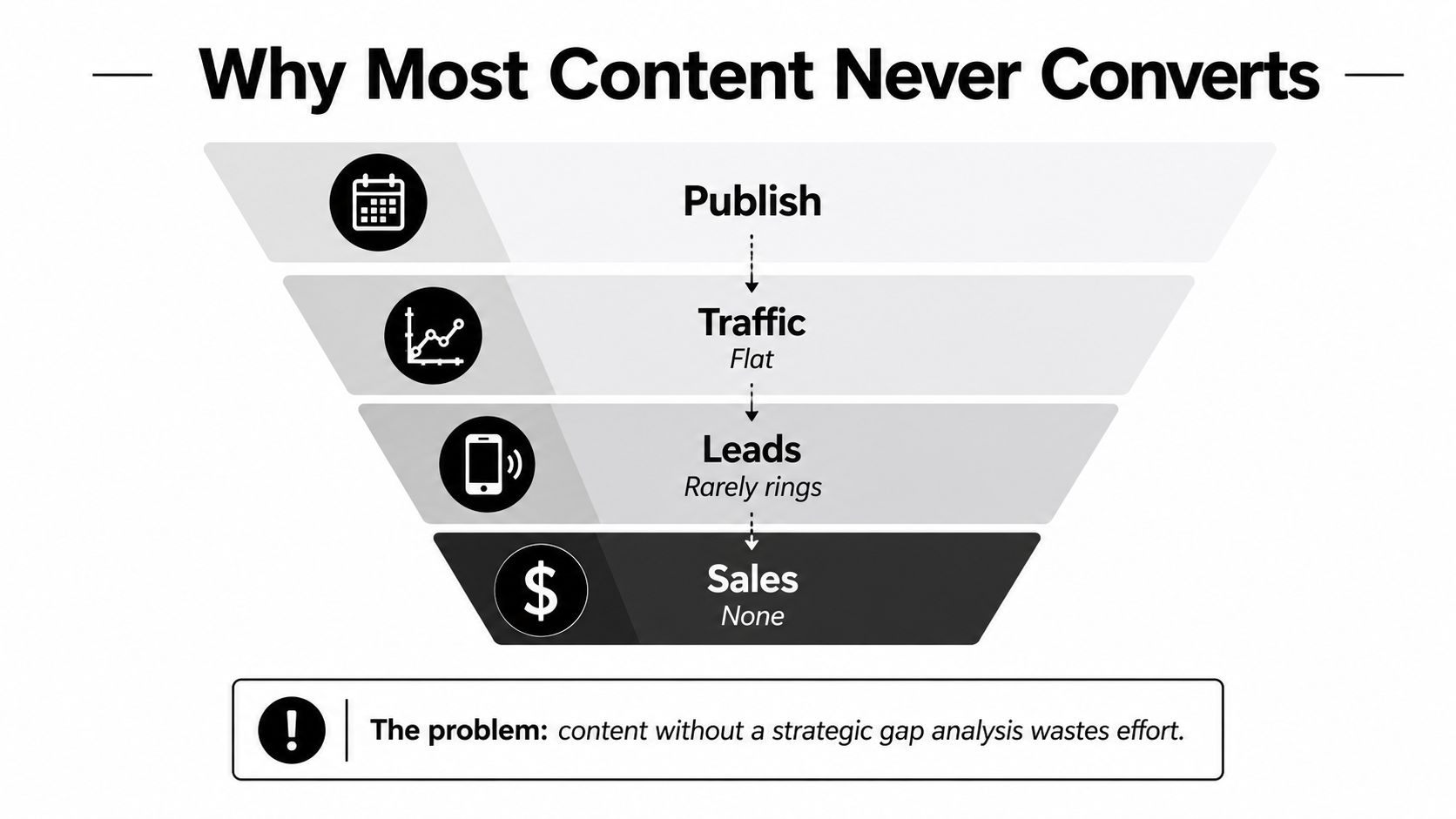
A lot of teams still run content like this, Publish leads to Traffic, traffic looks flat, Leads rarely show up, and Sales never connect to the calendar. The fix is to audit what the site covers, what competitors answer, and what buyers still need before they act.
Why Most Content Never Converts
Most small businesses don't have a publishing problem. They have a decision-stage coverage problem. They write posts that attract curious readers, then wonder why those readers don't become leads, because the content never answers the questions people ask right before they contact a vendor.
That's why I don't start a content gap analysis with keywords alone. I start with the buyer's next move. If someone is comparing service providers, they need proof, pricing context, a clear offer, local relevance, or a direct path to contact. If your site only has general educational posts, you've created attention without momentum.
Practical rule: If a page can't help someone move from interest to action, it's not a revenue page, it's just a traffic page.
The right mental model is simple. A gap isn't only a missing topic. It can also be a missing format, a missing audience angle, or a stale page that no longer matches search intent. That's why modern SEO references describe gap analysis as comparing your pages against competitors' rankings, then checking coverage, freshness, engagement, and performance signals, not just topics alone, as outlined in the formalized workflows discussed by Semrush's content gap analysis guide and Rank Math's content gap analysis framework.
If you want the short version, here it is. Traffic is not the goal. Revenue-stage coverage is the goal. The rest of this playbook is about finding the pages that block action, fixing them in the right order, and stopping the habit of publishing content that looks busy but doesn't sell.
Set Goals and KPIs Before You Touch Data
Start with business outcomes, not page ideas. Before you open a tool, write down what the audit is supposed to change in the business. For most SMBs, that means more qualified leads, more booked calls, more local actions, or more sales-supporting pages that move prospects closer to buying.
I'd keep this to three to five KPIs max. Too many metrics turn the audit into a reporting exercise. Pick the handful that match the funnel stages that matter most, then write a one-page statement that says why you're doing the work and what “better” means. If your team can't explain that in plain English, the audit will drift.
A clean way to build the KPI sheet is this:
- Lead KPIs: form fills, calls, booked appointments, quote requests.
- Local KPIs: directions clicks, calls from Maps, listing actions.
- Revenue-stage KPIs: demo requests, consultation bookings, comparison-page clicks, service-page conversions.
- Support KPIs: internal link clicks to service pages, FAQ engagement, time on page for decision content.
If you need a benchmark for how a content strategy should connect to measurement, SWAT Marketing Solutions lays out a practical lead-generation KPI approach in its KPI lead generation resource. Use that thinking here. Don't measure content just because you can.
The point of this step is to prevent a common failure. Teams chase traffic, then celebrate when impressions rise even though leads don't. That's the wrong scoreboard. Define the revenue signal first, then let the content audit tell you which pages deserve attention.
Inventory Your Content and Pull the Real Numbers
Now open the spreadsheet and stop guessing. Export every indexable URL you care about, then add the fields that tell you whether the page is helping or dragging the site down. At minimum, capture the topic, target keyword, publish date, last-updated date, organic traffic, ranking position, bounce rate, conversion rate, and a simple funnel-stage label.
The fastest source stack is straightforward. Use Google Search Console for queries, clicks, impressions, CTR, and average position. Use analytics for engagement and conversions. Then scrape the site map or crawl the site so you don't miss orphaned pages, old posts, or service pages that should have been refreshed months ago.
| Content Inventory Columns to Capture | Why It Matters | Source |
|---|---|---|
| URL | Creates the master list of pages to audit | Crawl, sitemap, export |
| Target keyword | Shows the intended search focus | Search Console, content brief |
| Publish date | Helps identify aging content | CMS |
| Last-updated date | Flags freshness issues | CMS |
| Organic traffic | Shows whether the page attracts demand | Analytics, Search Console |
| Ranking position | Reveals visibility level | Search Console, SEO tool |
| Bounce rate | Signals possible mismatch or weak engagement | Analytics |
| Conversion rate | Shows whether the page contributes to revenue | Analytics, CRM |
| Topic label | Groups pages by subject and intent | Your spreadsheet |
Once the sheet exists, tag every page by buyer pain point and funnel stage. A service page should not sit in the same bucket as a blog post about “how to choose.” A comparison page should not be confused with an educational glossary entry. If you don't label the library by business role, you'll never see which content is missing from the revenue path.
For a practical website-wide review process, SWAT Marketing Solutions describes the broader audit mindset in its website audit overview. Use that as the container, then make the content inventory one part of the overall audit. The spreadsheet is your source of truth, not a rough note pad.
Map Competitors and the True SERP
Most businesses benchmark against the wrong companies. They compare themselves to local rivals or familiar brands, then miss the domains winning the queries they want. The right comparison set comes from the SERP itself. If a page outranks you for your target topic, that page is a competitor, whether or not it sells the same thing you do.
Start with five to ten domains, not fifty. Pull the pages that rank for your priority topics, note the page type, and record what they do better. A few pages will be obvious. Others will look weak at first glance, but they may win because they answer the query more directly, use a better format, or cover related questions you skipped.
A strong workflow pairs that SERP review with competitive intelligence templates. If you want a structured way to gather what competitors publish, how they frame offers, and which topics they keep repeating, the competitive intelligence workflows and templates from HarvestMyData are a useful model to borrow from.
What matters now is the search environment, not just direct rivals. AI Overviews, social search, and other zero-click surfaces change what “visibility” means. A page can rank and still lose the click if it isn't structured for easy citation or summary. That's why the true competitor set includes whoever gets surfaced, quoted, or summarized in the result experience your buyers see.
Keep this straight: if a result consistently occupies the answer space, it's part of your competitive set even if it isn't a business rival.
Refresh this list each quarter. Queries change. Formats change. What wins in the SERP today may be a guide next quarter and a video result after that. Treat the competitor map as a living input, not a one-time research task.
Spot the Four Gap Types You Are Actually Missing
Keyword gaps are loud, but they're only one category. If you only look for missing queries, you'll miss the issues that keep pages from converting. I break the work into four lenses, keyword, format, audience segment, and freshness, because each one points to a different fix.
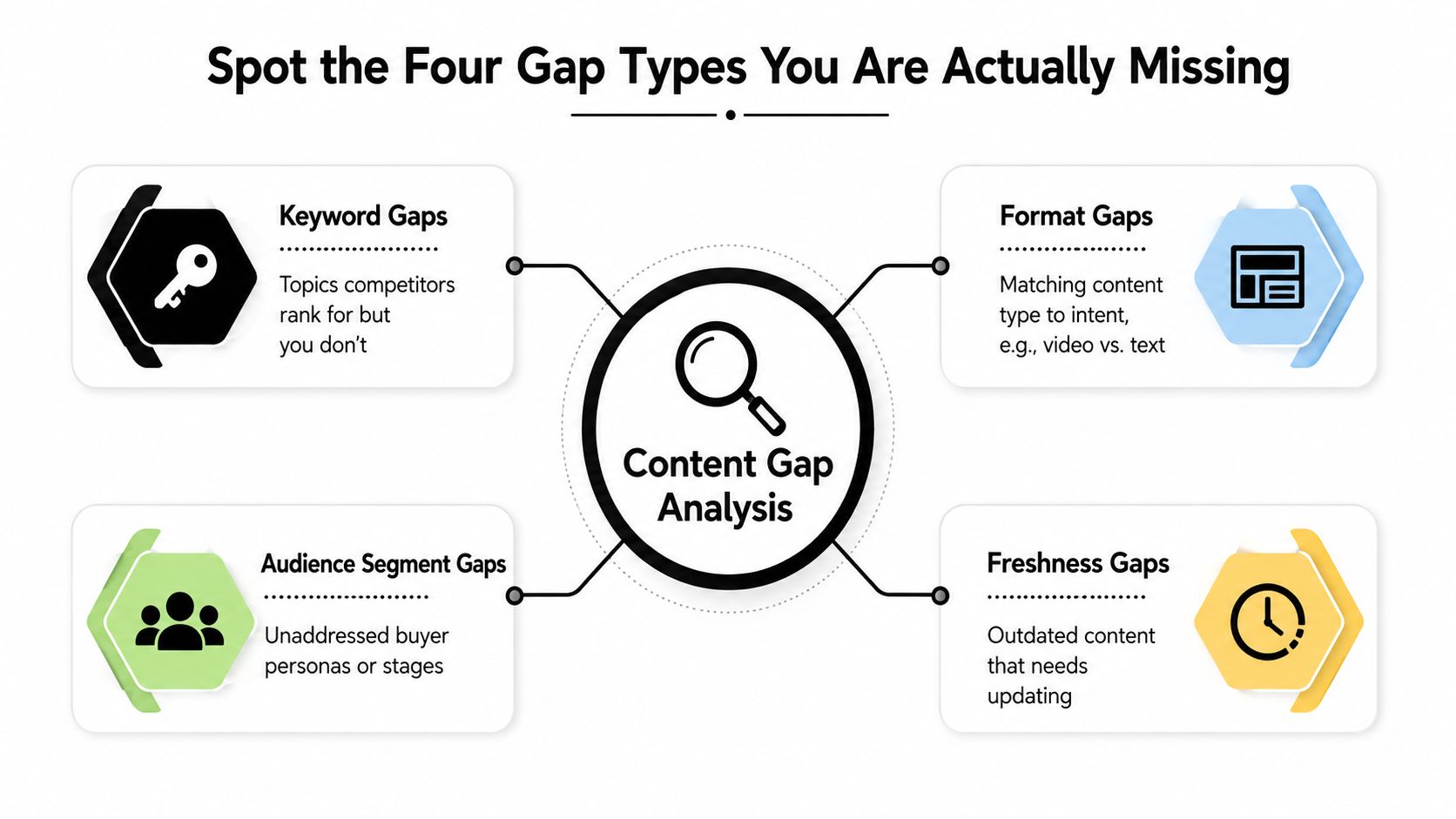
- Keyword gaps are the obvious ones. Competitors rank for a topic you don't cover at all.
- Format gaps show up when the topic exists, but the format doesn't fit the intent, like using a long blog post where a comparison page, FAQ, or short explainer would work better.
- Audience segment gaps happen when you speak to one buyer but ignore another, such as homeowners while ignoring property managers, or first-time buyers while ignoring ready-to-compare prospects.
- Freshness gaps are the pages that once worked but now feel stale, unsupported, or outdated.
The simplest scoring rubric I use is Coverage, Intent Match, and Business Value. Score each gap on those three dimensions, then push the items with strong business value and weak current coverage to the top. A missing decision-stage comparison page scores very differently from a missing early-stage glossary article. Don't let them compete in the same bucket.
The operational risk here is important. Expert frameworks warn that teams often mistake a keyword hole for the whole problem, when the deeper issue is outdated facts, missing related terms, or underdeveloped pages that should be updated rather than replaced, as described in Alex Groberman Labs' content gap analysis framework. That's the right caution. A lot of your “new content” opportunities are repair jobs.
A page that covers the topic but not the decision is still a gap.
Prioritize by Revenue Stage and Conversion Friction
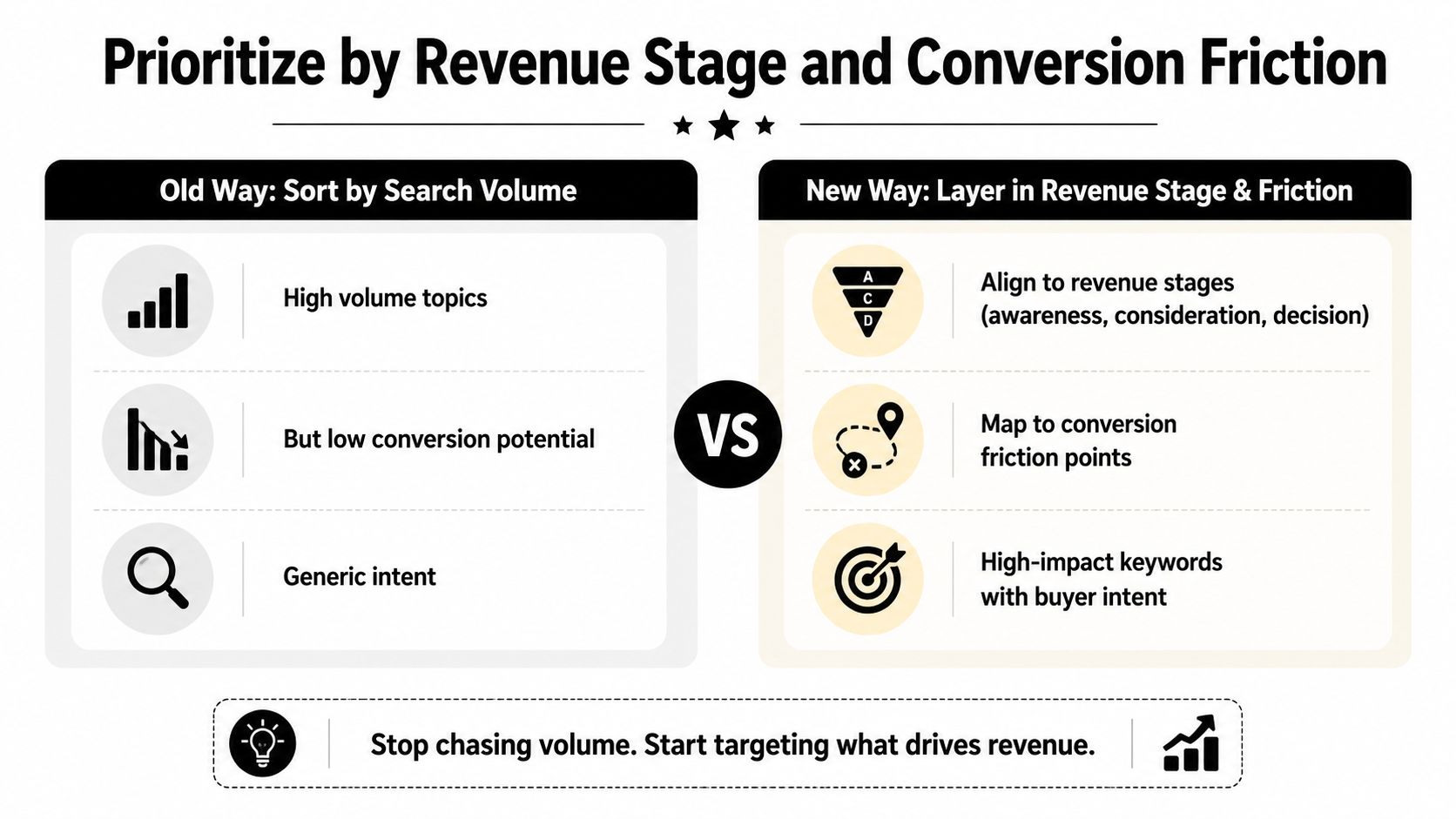
The audit gets serious here. Sort opportunities by revenue stage and conversion friction, and stop letting search volume drive the queue. A low-volume page that answers a late-stage question and removes objections can matter more than a broad informational post that brings vanity traffic and little else.
Start with the buyer's stage. Put each gap into awareness, consideration, or decision content. Then identify what blocks action. The site may lack proof, the service page may skip the process, the location page may ignore Google Maps actions, or the buyer may be ready while the site still has no comparison page to help them choose.
Use this order with SMB clients:
- High priority: decision-stage pages, local proof, comparison content, service pages, and pages that can lift calls or booked appointments quickly.
- Medium priority: support content that strengthens the path to those pages, such as FAQs, objection handlers, and related guides.
- Lower priority: broad educational topics with weak conversion paths or no clear buyer link.
If you run a local service business, this matters even more. A page can rank and still underperform if it does not support local trust, calls, or Map actions. Treat conversion friction as a first-class filter, not a side note. If a page needs stronger trust signals, a clearer offer, or a sharper CTA, it does not belong at the top of the publishing queue.
Use a conversion lens before you assign resources, then tie that to conversion rate optimization guidance. The goal is fewer wasted pages and more pages that move people to act. A page that covers the topic but not the decision stage is still a gap.
Build Briefs and a 90-Day Editorial Roadmap
A prioritized list is not a plan. You still need briefs, owners, and dates. I'd turn the top opportunities into one-page content briefs before anyone writes a draft. That keeps the work focused on search intent, proof, and conversion, instead of letting each writer reinvent the page from scratch.
A strong brief should include target keyword, search intent, format, proof elements, internal links, and the call to action. If the page is meant to support sales, say so. If the page needs local proof, list the proof source. If it should push readers toward a quote request or consultation, write that down in the brief itself. The CTA should not be an afterthought inserted at the end.
Use this standard: one brief, one owner, one outcome.
Then build the roadmap around a mix of three content types. New decision-stage pages get the fastest path to revenue. Refreshes fix stale posts and service pages. Supporting assets, like FAQs, comparisons, and case-style pages, help your money pages rank and convert better. You don't need to publish everything at once. You need a sequence that compounds.
A practical 90-day structure looks like this:
- Month one: publish the highest-impact decision-stage pages and fix the worst freshness gaps.
- Month two: add supporting content that answers objections and links into the core pages.
- Month three: review performance, update underperforming pages, and close any remaining proof gaps.
Keep the measurement loop simple. In the first 30 days, watch impressions, clicks, and whether the page is getting indexed and surfaced. By 60 days, look at engagement, internal click paths, and early conversion signals. By 90 days, compare lead quality, booked calls, and assisted conversions against the original goal sheet. If the page is attracting traffic but not moving users toward the next step, the brief missed the mark.
Don't fall into the usual traps. Chasing volume instead of intent will waste the quarter. Ignoring local SEO and Maps actions will starve service businesses of real leads. Treating the audit as a one-off project will let the same gaps come back. Publishing without circling back to measure conversion will make the next audit just as blind as the last one.
SWAT Marketing Solutions helps businesses build SEO-ready sites, content strategy, local SEO, and lead-generation systems that can surface missing topics and turn them into pages that support action. If you want help turning a content gap analysis into a working plan, visit SWAT Marketing Solutions and ask for a free digital analysis, then use the findings to prioritize the pages that can drive leads this quarter.