
So you are wondering, “how to optimize google business profile”? Think of your Google Business Profile as more than just a listing—it’s the digital front door to your business. Properly optimizing it means filling out every single section with accurate, keyword-rich details and keeping it buzzing with fresh posts, photos, and reviews. This process is free, straightforward, and absolutely essential for showing up in local Google searches and on Maps, putting you right in front of customers actively looking for you.
Why Your Google Business Profile Is Your Most Important Local Asset
For any local business, your Google Business Profile isn’t just another line on your marketing to-do list; it’s your digital storefront. If you neglect it, you’re practically leaving money on the table.
We see it all the time. A local restaurant misses the weekend dinner rush because its hours are wrong on Google. A contractor loses out on a huge job because their listed service areas are out of date. These aren’t just made-up scenarios—they happen every single day.
This “How to Optimize Google Business Profile for Local Dominance” guide goes beyond the basic setup. We’re sharing the exact strategies we’ve used to help businesses right here in Morristown, NJ, and beyond transform their profiles from a simple listing into a powerful tool for attracting new customers. A fully optimized profile means more phone calls, more clicks to your website, and more people walking through your door. It’s that simple.
The Foundation of Local Search Visibility
Your GBP is often the very first interaction a potential customer has with your brand. Just think about your own behavior. When you search for “plumber near me” or “best coffee in town,” Google’s Map Pack is almost always the first thing you see.
- Dominating the Map Pack: A well-optimized profile gives you the best possible shot at appearing in this highly coveted, top-of-the-page section, often placing you above the standard organic website results.
- Building Instant Trust: It’s a fact that complete profiles with recent photos and a steady stream of positive reviews are 70% more likely to attract visits from potential customers.
- Controlling Your Narrative: Your profile allows you to answer common questions before they’re even asked, helping you manage customer expectations and show off your brand’s unique personality from the get-go.
A strong GBP is the cornerstone of any successful https://swatmarketingsolutions.com/seo/local-seo/ strategy. It sends a clear signal to Google that you’re a legitimate, active, and trustworthy business that deserves to be recommended to its users.
Your Google Business Profile is the digital handshake that introduces your business to the local community. It’s where first impressions are made, trust is built, and buying decisions are heavily influenced—long before a customer ever visits your website.
Beyond a Simple Listing
Too many business owners make the mistake of setting up their profile and then letting it gather dust. This “set it and forget it” approach is a massive missed opportunity. An active, optimized GBP works as a dynamic marketing channel on its own.
While your GBP is a crucial piece of the puzzle, a comprehensive strategy often includes strong social media marketing for local businesses to broaden your online presence and connect with the local community. By consistently updating your profile with posts, new photos, and responses to reviews, you’re not just feeding Google fresh content—you’re engaging directly with your audience at the precise moment they need your services. This guide will show you exactly how to do it.
Laying the Groundwork for a Winning Profile
Before you can even think about advanced tactics, you have to get the basics right. Optimizing your Google Business Profile starts with a rock-solid foundation. These core details are the first thing Google looks at to understand who you are, what you do, and whether you’re a legitimate business it can trust.
Think of it this way: if your core information is shaky, all the fancy optimization tricks in the world won’t matter. Getting these fundamentals perfect sends clear, consistent signals to Google that you’re active, professional, and exactly what local searchers are looking for.
The Critical Role of NAP Consistency
One of the most important—and often overlooked—concepts in local SEO is NAP consistency. This simply means your Name, Address, and Phone number must be identical everywhere online.
Google is a bit of a detective. It cross-references your NAP across your website, social media, and other online directories to verify that you are who you say you are. Inconsistencies, even tiny ones like using “St.” on your profile but “Street” on your website, can create confusion and signal a lack of trustworthiness, which can tank your local rankings.
Pro Tip: Always list a local phone number with a local area code. Avoid using a toll-free 800 number if you can. A local number is a powerful signal that reinforces your connection to the community you serve, which is exactly what Google wants to see for local search.
The path to getting more customers from Google is straightforward when you start with a strong foundation.
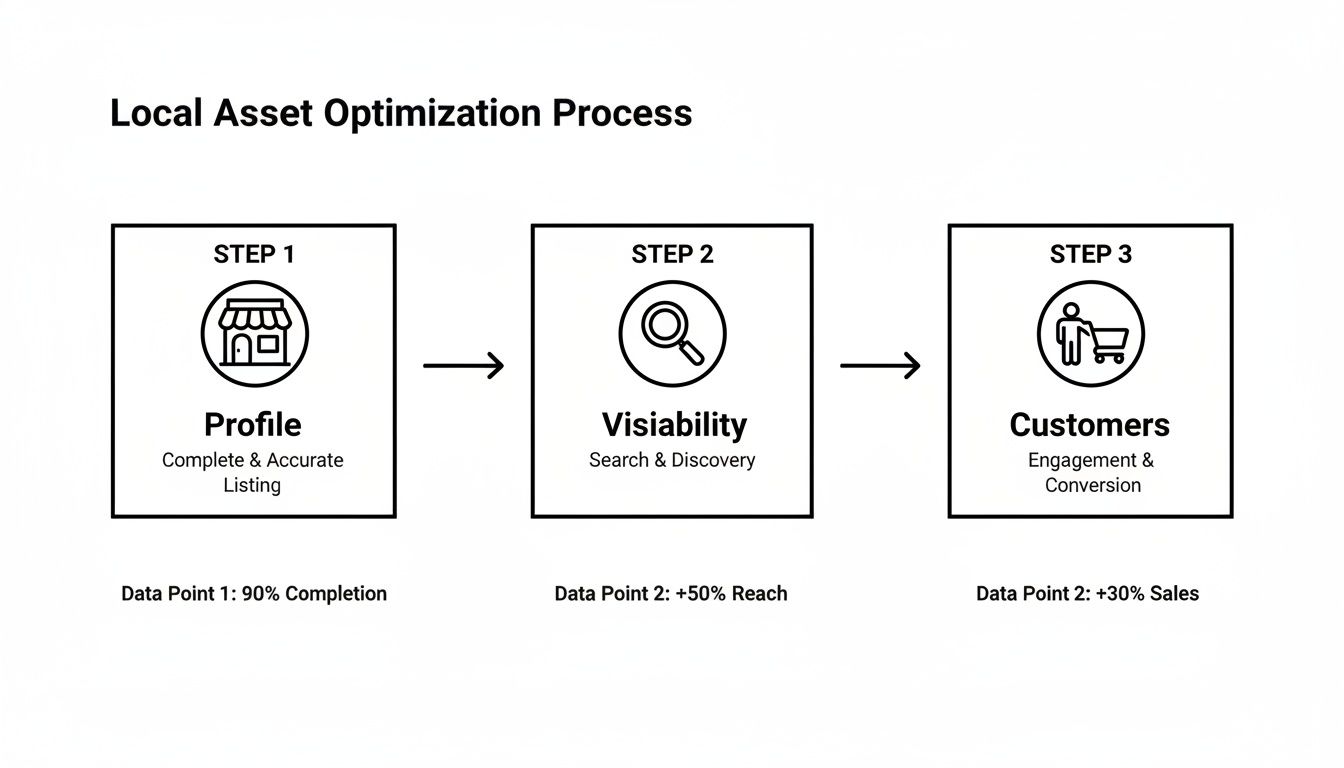
This process shows how a well-optimized profile directly leads to better visibility, which in turn brings in more customers.
To help you nail the essentials, I’ve put together a quick checklist. Run through these core sections of your profile to make sure everything is filled out completely and strategically.
GBP Core Information Checklist
| Profile Section | What to Do | Pro Tip |
|---|---|---|
| Business Name | Use your real-world, registered business name exactly as it appears on your signage. | Avoid adding keywords or locations to your name (e.g., “Apex Plumbing – Best Plumber in Denver”). This is against Google’s guidelines and can get you penalized. |
| Address | Enter a precise, physical address that you can verify. If you’re a service-area business, you can hide your address after verification. | Make sure the address format (St. vs. Street, Suite vs. Ste.) matches what’s on your website and other directories perfectly. |
| Phone Number | Use your primary, local business phone number. | Double-check that this number is clickable on mobile devices when listed on your website. |
| Website | Link directly to your website’s homepage. | Use a URL with tracking parameters (UTM codes) to see how much traffic your GBP is sending to your site in Google Analytics. |
| Business Hours | Set your regular hours accurately. Be sure to update them for holidays or special events. | Use the “Special Hours” feature for holidays. An updated profile signals to Google that you are actively managing your listing. |
Getting these pieces right is non-negotiable. They form the bedrock of your local SEO efforts.
Choosing Your Business Categories
Your primary category is arguably the most powerful ranking factor on your entire profile. It’s your one-sentence pitch to Google about what your business is. Out of over 4,000 options, you have to pick the one that is most specific and accurate.
- Get Specific: Don’t just pick “Restaurant” if you’re a “Pizzeria.” Don’t choose “Contractor” if you’re a “Roofing Contractor.” The more specific, the better.
- Add Secondary Categories: After locking in your primary category, add others that describe what else you offer. That Pizzeria could add “Italian Restaurant” and “Pizza Delivery” to show up in a wider range of relevant searches.
For instance, a local bakery in Morristown should absolutely choose “Bakery” as its primary category. Then, it could add secondary categories like “Cake Shop,” “Coffee Shop,” or “Dessert Shop.” This simple strategy helps them appear when people search for “custom cakes near me,” not just “bakeries in Morristown.”
Writing a Business Description That Converts
Your business description is your chance to speak directly to potential customers while weaving in important keywords. You get 750 characters—use them wisely.
Instead of a boring “We are a bakery that serves fresh goods,” our Morristown bakery could write something with personality:
“Welcome to The Rolling Pin, Morristown’s favorite neighborhood bakery! For over 15 years, we’ve specialized in handcrafted sourdough bread, custom cakes, and artisanal pastries made from locally sourced ingredients. Stop by for a freshly brewed coffee and a warm croissant, or order a specialty cake for your next celebration. We proudly offer gluten-free and vegan dessert options.”
This version is engaging, includes keywords customers might search for (“custom cakes,” “artisanal pastries,” “gluten-free”), and mentions its local roots.
The impact of simply completing your profile is massive. Businesses with complete profiles are 70% more likely to attract location visits from customers. What’s more, these fully optimized profiles show up in 80% more searches and pull in far more calls, clicks, and direction requests than their incomplete competitors. For a deeper dive into these stats, check out the great work done by iLocal Hero on their Google Business Profile optimization blog.
Bringing Your Business to Life with Visuals, Posts, and Products
If you’ve only filled out the basic details, your Google Business Profile is just a skeleton. It’s time to bring it to life. Adding dynamic content like photos, videos, posts, and product catalogs shows customers you’re active, relevant, and ready for their business.
Think of it this way: your foundational details are the “what” and “where,” but your visuals and posts are the “why.” They inject personality, build trust, and give people a real reason to choose you over the competition.

Showcase Your Business with High-Quality Photos and Videos
People want to see what they’re getting before they walk through the door. High-quality visuals are your fastest path to building trust and setting the right expectations. Let’s be honest, a profile packed with great photos just feels more legit.
And please, stay away from generic stock photos. Authenticity is everything. Your goal is to give potential customers a virtual tour before they even leave their couch.
To create a complete picture, be sure to upload a mix of different shots:
- Exterior Shots: Clear, well-lit photos of your storefront from a few different angles are a must. This helps people recognize your business from the street—no more circling the block.
- Interior Ambiance: Capture the vibe inside. Show off your decor, your layout, or your cozy seating areas. Let people imagine themselves there.
- Team Photos: Putting a friendly face to the name builds an instant human connection. A professional but approachable group photo can make your brand feel much more welcoming.
- Products or Services in Action: Don’t just show a product on a shelf; show it being used. A baker needs photos of fresh bread coming out of the oven. A landscaper should feature stunning before-and-after shots of a garden transformation.
A short video can be even more powerful. Try a quick 30-second tour of your office or shop, a clip of your team working, or a brief message from the owner. This adds a layer of personality that static photos just can’t match.
Drive Engagement with Strategic Google Posts
Think of Google Posts as mini-updates that pop up right on your profile when people find you in search. This is a killer tool for sharing timely info and signaling to Google that you’re an active, engaged business.
Try to publish a new post at least once a week. It’s less about quantity and more about consistency. A steady stream of updates keeps your profile from looking abandoned.
Google Posts are your profile’s billboard. Use them to announce what’s new, share special offers, and highlight what makes your business unique. Each post is another chance to grab a searcher’s attention.
Get creative with the different post types. A local boutique, for instance, can use an ‘Offer’ post to announce a “25% off summer sale” with a clear start and end date to create urgency. An IT company might use an ‘Update’ post to share a new cybersecurity tip, positioning itself as an expert.
Build a Digital Catalog with Products and Services
The ‘Products’ and ‘Services’ tabs are two of the most powerful—and most overlooked—features on your profile. These sections let you build out detailed catalogs that can capture customers who are ready to buy.
If you’re a service-based business like a plumber or a marketing agency, this section is non-negotiable. Don’t just list “Plumbing.” Get specific and break it down:
- Emergency Leak Repair
- Drain Cleaning Services
- Water Heater Installation
- Bathroom Fixture Replacement
Each service gets its own description, giving you more real estate to drop in relevant keywords and explain the value you deliver.
For businesses selling physical goods, the ‘Products’ feature is basically a mini-storefront right on Google. A local hardware store can create categories like “Gardening Supplies” or “Power Tools,” then add individual items with photos, descriptions, and prices. This lets people browse your inventory before they even hit your website, making their path to purchase much shorter.
When you take the time to fill out these sections, you’re not just providing information. You’re building a rich, searchable database of everything you offer, making it way easier for Google to connect you with the right customers.
Building Unshakeable Trust with Reviews and Q&A
Your local search reputation isn’t just important—it’s everything. Once you’ve brought your profile to life with great photos and timely posts, it’s time to build deep, unshakeable trust. This is where your customer interactions take center stage, specifically through reviews and the often-ignored Questions & Answers (Q&A) feature.
These two pieces are the strongest forms of social proof you have. They signal to both Google and your potential customers that you’re a legitimate, customer-first business people can count on.
Mastering the Art of Google Reviews
Reviews are a massive local ranking factor. When Google’s algorithm sees a steady stream of recent, positive feedback, it takes that as a clear sign of a healthy, relevant business. But algorithms aside, reviews are what real people use to decide where to spend their money.
An incredible 93% of consumers say online reviews influence their purchasing decisions. That’s almost everyone! And since Google handles 81% of all online review volume, it’s the most critical place to focus your efforts.
How to Ethically Get More Reviews
Getting a consistent flow of reviews doesn’t have to be awkward or pushy. The key is making it a natural part of your process.
- Ask at the right moment: The best time is right after a positive experience. For a roofer, it’s after the client is thrilled with their new roof. For a restaurant, it’s when the customer is happily paying the bill.
- Make it dead simple: Don’t make people hunt for the link. Create a direct review link and share it via email, text, or even a QR code on your invoice. Remove every bit of friction.
- Train your team: Your staff can be your biggest asset. A simple, personal ask goes a long way. “We’re so glad you were happy with our service today! If you have a moment, leaving us a review on Google would mean the world.”
Never, ever offer discounts or freebies for reviews. This is against Google’s policies and, frankly, it cheapens the trust you’re trying to build. Authenticity is everything.
Why You Must Respond to Every Single Review
How you handle reviews is just as important as getting them. A quick, professional reply shows everyone—current customers, future customers, and Google—that you’re engaged and that you care. This is a core part of any good online reputation management strategy.
When you get a positive review, a simple “thank you” works wonders. Mentioning the specific service they loved adds a nice personal touch.
Example Positive Response:
“Thank you so much for the kind words, Sarah! We’re thrilled you enjoyed the custom cake for your celebration. It was a pleasure creating it for you, and we look forward to seeing you again soon!”
Negative reviews are an opportunity, not a disaster. How you handle criticism in public can win over more customers than a five-star review ever could.
Example Negative Response:
“Hi Mark, thank you for your feedback. We’re very sorry to hear that your experience didn’t meet your expectations. This is not the standard we aim for, and we’d appreciate the chance to make things right. Please give us a call at [Phone Number] at your convenience.”
Control the Narrative with Proactive Q&A
The Q&A section on your profile is a goldmine. It lets you get ahead of common questions and strategically place your most important keywords. The best part? You don’t have to wait for customers to ask.
You can—and absolutely should—seed your own Q&A. Think about the top five or ten questions your team answers all the time.
- Do you offer free estimates?
- Are you open on weekends?
- Is there parking available?
- What areas do you service?
Post these questions yourself, then immediately answer them with clear, helpful information. This builds a public-facing FAQ right on your profile, saving your team time and helping customers get answers instantly. Each answer is another chance to naturally work in terms related to your services, boosting your relevance for those searches.
Using Data to Drive Your Optimization Strategy
Optimizing your Google Business Profile isn’t a “set it and forget it” task. Think of it more like a continuous feedback loop. Simply filling out your profile gets you to the starting line, but winning the local search race means you have to constantly listen to what the data is telling you. This is where your Google Business Profile Insights dashboard becomes your most valuable strategic tool.
Instead of getting bogged down in a sea of numbers, the real goal is to turn these metrics into a genuine competitive advantage. Your data tells a story about your customers and how they find you. Your job is to read that story and adjust your strategy accordingly.
Decoding Your Performance Metrics
Your Insights dashboard shows you exactly how people are interacting with your profile. Making sense of these key performance indicators (KPIs) is the first step toward making smarter decisions for your business.
- How Customers Search for Your Business: This chart is crucial. It shows if people found you through a “Direct” search (typing your business name), a “Discovery” search (looking for a category or service you offer), or a “Branded” search (searching for a brand you carry). A high percentage of Discovery searches is a fantastic sign—it means your optimization efforts are attracting new customers who didn’t even know you existed yet.
- Customer Actions: This is where you see the payoff. It tracks the most important conversions happening right on your profile, like website clicks, requests for directions, and phone calls.
- Search Queries: Honestly, this section is an absolute goldmine. It gives you the exact search terms people typed into Google to find your profile. This is raw, unfiltered data showing what your audience is actually looking for.
Don’t just glance at these metrics—interrogate them. If you see a spike in phone calls right after you publish a specific Google Post, that’s a huge signal to create more content just like it. If direction requests are low, maybe it’s time to add more compelling exterior photos so people can easily spot your location from the street.
Turning Insights Into Actionable Strategy
Once you get a handle on what the data means, you can use it to fine-tune every single part of your profile. For instance, make it a habit to regularly review the Search Queries report. You’ll likely find valuable keywords you completely overlooked.
Imagine a local plumbing company sees people searching for “emergency tankless water heater repair,” but that specific phrase isn’t listed in their services. That’s a clear signal to add it immediately. This simple change makes their profile more relevant and far more likely to show up for those high-intent searches.
Ranking higher has a direct, measurable impact. The very first search result captures an average of 31.7% of all clicks, making those top spots incredibly valuable. This is especially true for local businesses. Google’s 2023 data shows that fully completed profiles get 7x more clicks than incomplete ones. Since Google uses GBP data as a core local ranking signal, analyzing your insights to keep your profile complete and relevant is mission-critical. You can discover more insights about Google’s 2023 GBP findings on gmbapi.com.
Advanced Tracking and Analysis
To get an even clearer picture of your performance, you need to look beyond the basic dashboard. Implementing more advanced tracking helps you measure the true return on your optimization efforts.
- Use UTM Parameters: Add UTM tracking codes to the website link in your GBP. This is a game-changer because it lets you see exactly how many users click from your profile to your site within Google Analytics. It separates your GBP traffic from general organic search, giving you undeniable proof of its value.
- Analyze Phone Call Data: Take note of the times and days you get the most calls from your profile. This can help you make better staffing decisions or figure out the perfect time to run a Google Post with a strong call-to-action.
- Leverage Attributes: Don’t sleep on Attributes like “Woman-owned” or “Online appointments.” These aren’t just informational tags; they’re search filters. Google adds new ones all the time, so check back regularly and apply every single one that’s relevant to you. This helps you stand out in more specific, filtered searches.
To make sure all your optimization efforts are built on a solid foundation, understanding data quality is essential. You can explore a guide on data quality best practices for reliable analytics. By combining these insights, you create a powerful feedback loop that continually improves your visibility and brings more customers through your door. For a deeper dive into how this all fits into your overall marketing picture, check out our guide on analytics and reporting.
Common Questions on Google Business Profile Optimization
Even with the best strategy in hand, you’re going to have questions once you get into the nitty-gritty of optimizing your Google Business Profile. Let’s tackle some of the real-world queries we hear from business owners every day. Here are direct, no-fluff answers to help you handle the finer points of managing your listing.
How Often Should I Update My Google Business Profile?
Your profile isn’t a static webpage; think of it as a living, breathing part of your online presence. When you’re consistently active, it signals to Google that your business is open, active, and relevant. That directly helps your local search ranking.
The best approach is to set up a simple, repeatable schedule.
- Content Audit (Monthly): At least once a month, do a quick check of your core information. Are the hours still correct? Is the phone number right? This takes five minutes and can save you from losing customers over bad info.
- Google Posts (Weekly): Try to get at least one Google Post published every week. This keeps your profile looking fresh and shows Google’s algorithm you’re engaged.
- Photo Uploads (Quarterly): Every quarter is a great time to add new, high-quality photos. Showcase seasonal decorations, new team members, or photos of your latest work.
- Reviews & Q&A (Daily): This one is time-sensitive. You really want to respond to every new review and question within 24 hours. Quick replies show customers you’re paying attention and value their input.
This kind of consistent upkeep is a powerful way to get ahead of competitors who just “set it and forget it.”
What Is the Best Way to Handle a Negative Review?
Getting a negative review can feel like a punch to the gut. But how you respond is a huge opportunity to show every other potential customer how professional you are. Ignoring it is the absolute worst thing you can do.
A calm, public response to a negative review can win you more future business than a dozen five-star ratings. It demonstrates accountability and a commitment to customer satisfaction that resonates with everyone.
Just follow a simple, three-part process:
- Acknowledge and Apologize: Start by thanking them for their feedback and acknowledging their poor experience. A simple apology that your service didn’t meet their expectations goes a long way, even if you don’t agree with their version of events.
- Avoid a Public Debate: Whatever you do, don’t get into a defensive back-and-forth in the reviews section. Your goal isn’t to win the argument; it’s to show you are a reasonable business owner.
- Take it Offline: Give them a direct phone number or email to resolve the issue privately. This shows you’re proactive and gets the conflict out of the public eye.
A simple response like, “We’re very sorry to hear this. That is not the standard we aim for. Please contact our manager, [Name], directly at [email/phone] so we can make this right,” is professional, effective, and ends the public discussion.
Can I Put Keywords in My Business Name?
No. Absolutely not. This tactic, often called “keyword stuffing,” is a direct violation of Google’s guidelines. It’s a fast track to getting your profile suspended.
Your business name on your Google Business Profile must exactly match your real-world, legal business name. It has to be what’s on your storefront sign and your official documents.
Adding extra words like “Morristown’s Best Roofer” or “Affordable Plumbing Services” to your name will get you penalized. The right way to use those valuable keywords is to weave them naturally into the other parts of your profile where they actually belong:
- Your business description
- Detailed service and product listings
- Weekly Google Posts
- Your responses to customer reviews
- Answers in the Q&A section
When you use keywords in these areas, you’re telling Google what you do without breaking the rules. Stick to that, and you’ll build a trustworthy profile that ranks for all the right reasons.
How Should I Manage Profiles for Multiple Business Locations?
If your business has multiple branches, you need to use the Business Groups feature in your GBP dashboard. This tool is essential, as it lets you manage all your individual profiles from one central hub, which is a massive time-saver.
But central management doesn’t mean you should use generic content. To win at local search, each location’s profile has to be uniquely optimized. Fight the urge to just copy and paste descriptions, posts, or photos across all your listings.
Localization is what matters here. Each profile should have its own unique photos of that specific storefront and its team. It should list services relevant to that local area and have its own set of location-specific reviews and Q&A. Responding to a review for your Morristown branch with a generic corporate message just doesn’t connect. The more you tailor each profile to its community, the better it’s going to perform.
Ready to stop guessing and start dominating local search? The experts at SWAT Marketing Solutions can transform your Google Business Profile into a lead-generating machine. Get your free website and SEO assessment today!